> For the complete documentation index, see [llms.txt](https://docs.rewst.help/llms.txt). Markdown versions of documentation pages are available by appending `.md` to page URLs; this page is available as [Markdown](https://docs.rewst.help/rewst-documentation/documentation/integrations/integration-guides/superops-integration.md).
# SuperOps integration
{% hint style="info" %}
If you’re new to integrations in Rewst, read through our introductory integration documentation [here](https://docs.rewst.help/documentation/integrations).
{% endhint %}
## What does the SuperOps integration do?
The SuperOps integration automates core MSP tasks, from customer-facing to internal operations. Use the SuperOps API within Rewst workflows to handle service management and business operations tasks, plus device, network, and customer management. Get more value out of SuperOps by connecting each step of their monitoring, automation, resolution, and payment functionalities to the rest of your tech stack.
## Why use the SuperOps integration?
* User onboarding and offboarding
* Categorize tickets using Open AI
* Connect the RMM and PSA capabilities of SuperOps to other integration's in Rewst's marketplace
## Set up the SuperOps integration
### Set up steps in SuperOps
1. Log in to your SuperOps application.
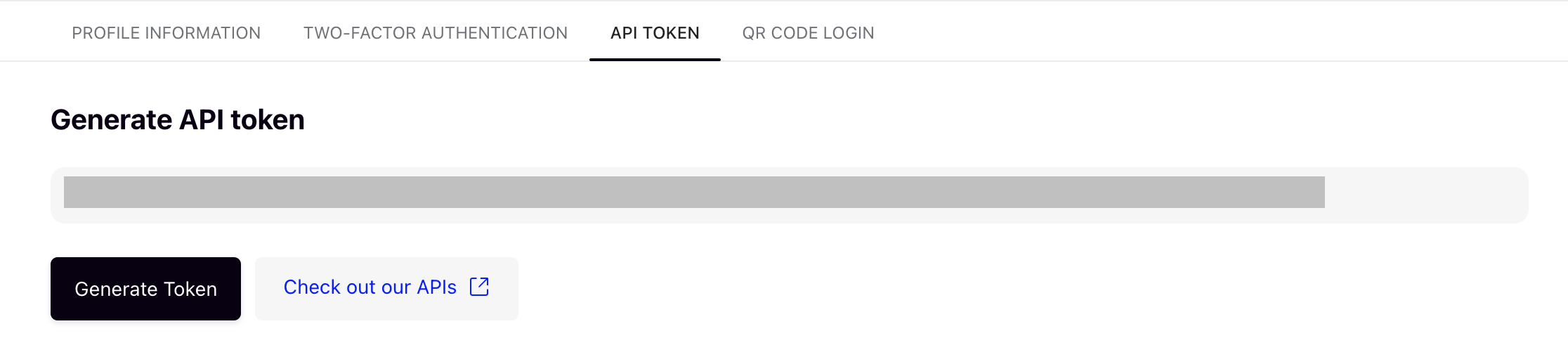
2. Navigate to **Settings > Your Profile > API token**.
3. Click **Generate Token.**
4. Copy the token. Save this for later use.
5. Navigate to **Settings > My Company > Company information**. \

6. Locate your subdomain under the **Branding** submenu. Copy the **Subdomain Name** and save it for later use.
{% hint style="info" %}
Next, add the PowerShell script. This portion of setup is optional for the general integration, but required for any workflows that require on-prem functionality. If you were a Rewst Classic user and set this script up for the original integration, there's no need to do it again for new Rewst. Your script will work the same for this integration without any additional updates.
{% endhint %}
1. Navigate to **> Scripts** in SuperOps.
2. Click **+ Script**.\
\

3. Enter the following information in the relevant fields on the screen that appears:
1. Script name: `Rewst PowerShell`
2. Description: `PowerShell Execution Wrapper for Rewst`
3. Set the **Language** in the drop-down selector to **PowerShell**
4. Set **Run as** as **System/Root User**
5. For **Script timeout duration**, set to a value of `20` mins
4. In the text editor, enter the following:
```powershell
[Net.ServicePointManager]::SecurityProtocol = [Net.SecurityProtocolType]::Tls12
$wc = New-Object System.Net.WebClient
$wc.Encoding = [System.Text.Encoding]::UTF8
$commands = ($wc.DownloadString($content_webhook))
$post_url = $post_webhook
iex $commands
```
9. Under the **Script variables** submenu, click **+ Add Run time Variables** to add the following:
* content\_webhook
* post\_webhook\
\

10. Click **Save**.
### Set up steps in Rewst
1. Navigate to **Integrations** in the left side menu of your Rewst platform.
2. In the Integrations page, search for the `SuperOps` integration.
3. Click on the integration tile to launch the configuration setup dialog.
4. Choose from either Production or Demo Mode for the setup of your integration:
1. **Production**: Connect with real credentials for live data
2. **Demo Mode**: Explore the integration with simulated mock responses
5. Click **Next: Configure and Authenticate**.
6. Select **+ Create New Credential from the Credential** drop-down selector.
7. Enter the information from SuperOps into the relevant fields:
1. **API Token**
2. **Subdomain -** Your SuperOps subdomain, for example `acme` from `acme.superops.ai`.
3. **Data Center** - The data center hosting your SuperOps account
1. US accounts call api.superops.ai
2. EU accounts call euapi.superops.ai.
4. **API Surface** - Which SuperOps product surface to call: MSP (/msp) or IT (/it)
8. Click **Save Credential**.
9. Click **Next: Confirm**.
10. Click **Install Integration**. The integration will now appear in the top Connected section of your Integrations page.
11. Click on the installed integration. Scroll down to the Org Mappings section of the configuration page and complete organization mapping as needed.
## Use custom PowerShell scripts with your RMM integration
This brand of RMM allows PowerShell scripts to be passed via API. The RMM runs your script on an endpoint, and Rewst has no way to see the result, so the script has to POST back to a Rewst URL. PowerShell only runs on the RMM's side, never inside Rewst. To report the script back to Rewst, you'll need to add a wait for [webhook callback node](https://docs.rewst.help/rewst-documentation/documentation/integrations/integration-guides/pages/27ztelCxRCWn8lmMEtvh#wait-for-webhook-tasks.wait_for_webhook). This will generate a unique callback URL and pause until an external system calls it or the timeout expires.
If using custom scripts, you'll need to add this to bottom of your existing script to ensure the call back to Rewst is made. The `$resumeUrl` / `$resumeToken` are on the node's URL Ready output, and the workflow passes both into the RMM script as parameters.
```
$postData = $PS_Results | ConvertTo-Json
Invoke-RestMethod -Method 'Post' -Uri $resumeUrl -Body $postData `
-ContentType 'application/json; charset=utf-8' `
-Headers @{ 'X-Rewst-Token' = $resumeToken }
```
Timeout is required and bounded: 60 seconds minimum, 604800 maximum, which is 7 days. You can control the response your script sees. The `responseStatus` defaults to 200, and there's an optional `responseBody`. This is useful if the RMM cares what came back.
## Triggers for SuperOps integration
| Trigger type name | Type | Description |
| ----------------- | ------- | ----------------------------------------------------------------------------------------------- |
| New Ticket Record | Polling | Trigger which returns an object containing the count of tickets, and an array of ticket objects |
{% hint style="success" %}
Got an idea for a new Integration? Rewst is constantly adding new integrations to our integrations page. Submit your idea or upvote existing ideas here in our [Canny feedback collector](https://rewst.canny.io/integrations).
{% endhint %}
---
# Agent Instructions
This documentation is published with GitBook. GitBook is the documentation platform designed so that both humans and AI agents can read, navigate, and reason over technical content effectively. Learn more at gitbook.com.
## Querying This Documentation
If you need additional information that is not directly available in this page, you can query the documentation by asking a question.
Perform an HTTP GET request on the following URL with the `ask` and `goal` query parameters:
```
GET https://docs.rewst.help/rewst-documentation/documentation/integrations/integration-guides/superops-integration.md?ask=&goal=
```
`ask` is the immediate question: it should be specific, self-contained, and written in natural language.
`goal` is what the user is ultimately trying to achieve, the reason they need the answer. Sharing it helps GitBook give you a better, more relevant answer. A goal is most helpful when it describes the outcome the user wants rather than restating the question. For example, with `ask=how do I create an API token`, a goal like `automate deployments from our CI pipeline` lets GitBook tailor the answer to that use case.
The response will contain a direct answer to the question and relevant excerpts and sources from the documentation.
Use this mechanism when the answer is not explicitly present in the current page, you need clarification or additional context, or you want to retrieve related documentation sections.
 **> Scripts** in SuperOps.
2. Click **+ Script**.\
\

3. Enter the following information in the relevant fields on the screen that appears:
1. Script name: `Rewst PowerShell`
2. Description: `PowerShell Execution Wrapper for Rewst`
3. Set the **Language** in the drop-down selector to **PowerShell**
4. Set **Run as** as **System/Root User**
5. For **Script timeout duration**, set to a value of `20` mins
4. In the text editor, enter the following:
```powershell
[Net.ServicePointManager]::SecurityProtocol = [Net.SecurityProtocolType]::Tls12
$wc = New-Object System.Net.WebClient
$wc.Encoding = [System.Text.Encoding]::UTF8
$commands = ($wc.DownloadString($content_webhook))
$post_url = $post_webhook
iex $commands
```
9. Under the **Script variables** submenu, click **+ Add Run time Variables** to add the following:
* content\_webhook
* post\_webhook\
\

10. Click **Save**.
### Set up steps in Rewst
1. Navigate to **Integrations** in the left side menu of your Rewst platform.
2. In the Integrations page, search for the `SuperOps` integration.
3. Click on the integration tile to launch the configuration setup dialog.
4. Choose from either Production or Demo Mode for the setup of your integration:
1. **Production**: Connect with real credentials for live data
2. **Demo Mode**: Explore the integration with simulated mock responses
5. Click **Next: Configure and Authenticate**.
6. Select **+ Create New Credential from the Credential** drop-down selector.
7. Enter the information from SuperOps into the relevant fields:
1. **API Token**
2. **Subdomain -** Your SuperOps subdomain, for example `acme` from `acme.superops.ai`.
3. **Data Center** - The data center hosting your SuperOps account
1. US accounts call api.superops.ai
2. EU accounts call euapi.superops.ai.
4. **API Surface** - Which SuperOps product surface to call: MSP (/msp) or IT (/it)
8. Click **Save Credential**.
9. Click **Next: Confirm**.
10. Click **Install Integration**. The integration will now appear in the top Connected section of your Integrations page.
11. Click on the installed integration. Scroll down to the Org Mappings section of the configuration page and complete organization mapping as needed.
## Use custom PowerShell scripts with your RMM integration
This brand of RMM allows PowerShell scripts to be passed via API. The RMM runs your script on an endpoint, and Rewst has no way to see the result, so the script has to POST back to a Rewst URL. PowerShell only runs on the RMM's side, never inside Rewst. To report the script back to Rewst, you'll need to add a wait for [webhook callback node](https://docs.rewst.help/rewst-documentation/documentation/integrations/integration-guides/pages/27ztelCxRCWn8lmMEtvh#wait-for-webhook-tasks.wait_for_webhook). This will generate a unique callback URL and pause until an external system calls it or the timeout expires.
If using custom scripts, you'll need to add this to bottom of your existing script to ensure the call back to Rewst is made. The `$resumeUrl` / `$resumeToken` are on the node's URL Ready output, and the workflow passes both into the RMM script as parameters.
```
$postData = $PS_Results | ConvertTo-Json
Invoke-RestMethod -Method 'Post' -Uri $resumeUrl -Body $postData `
-ContentType 'application/json; charset=utf-8' `
-Headers @{ 'X-Rewst-Token' = $resumeToken }
```
Timeout is required and bounded: 60 seconds minimum, 604800 maximum, which is 7 days. You can control the response your script sees. The `responseStatus` defaults to 200, and there's an optional `responseBody`. This is useful if the RMM cares what came back.
## Triggers for SuperOps integration
| Trigger type name | Type | Description |
| ----------------- | ------- | ----------------------------------------------------------------------------------------------- |
| New Ticket Record | Polling | Trigger which returns an object containing the count of tickets, and an array of ticket objects |
{% hint style="success" %}
Got an idea for a new Integration? Rewst is constantly adding new integrations to our integrations page. Submit your idea or upvote existing ideas here in our [Canny feedback collector](https://rewst.canny.io/integrations).
{% endhint %}
---
# Agent Instructions
This documentation is published with GitBook. GitBook is the documentation platform designed so that both humans and AI agents can read, navigate, and reason over technical content effectively. Learn more at gitbook.com.
## Querying This Documentation
If you need additional information that is not directly available in this page, you can query the documentation by asking a question.
Perform an HTTP GET request on the following URL with the `ask` and `goal` query parameters:
```
GET https://docs.rewst.help/rewst-documentation/documentation/integrations/integration-guides/superops-integration.md?ask=
**> Scripts** in SuperOps.
2. Click **+ Script**.\
\

3. Enter the following information in the relevant fields on the screen that appears:
1. Script name: `Rewst PowerShell`
2. Description: `PowerShell Execution Wrapper for Rewst`
3. Set the **Language** in the drop-down selector to **PowerShell**
4. Set **Run as** as **System/Root User**
5. For **Script timeout duration**, set to a value of `20` mins
4. In the text editor, enter the following:
```powershell
[Net.ServicePointManager]::SecurityProtocol = [Net.SecurityProtocolType]::Tls12
$wc = New-Object System.Net.WebClient
$wc.Encoding = [System.Text.Encoding]::UTF8
$commands = ($wc.DownloadString($content_webhook))
$post_url = $post_webhook
iex $commands
```
9. Under the **Script variables** submenu, click **+ Add Run time Variables** to add the following:
* content\_webhook
* post\_webhook\
\

10. Click **Save**.
### Set up steps in Rewst
1. Navigate to **Integrations** in the left side menu of your Rewst platform.
2. In the Integrations page, search for the `SuperOps` integration.
3. Click on the integration tile to launch the configuration setup dialog.
4. Choose from either Production or Demo Mode for the setup of your integration:
1. **Production**: Connect with real credentials for live data
2. **Demo Mode**: Explore the integration with simulated mock responses
5. Click **Next: Configure and Authenticate**.
6. Select **+ Create New Credential from the Credential** drop-down selector.
7. Enter the information from SuperOps into the relevant fields:
1. **API Token**
2. **Subdomain -** Your SuperOps subdomain, for example `acme` from `acme.superops.ai`.
3. **Data Center** - The data center hosting your SuperOps account
1. US accounts call api.superops.ai
2. EU accounts call euapi.superops.ai.
4. **API Surface** - Which SuperOps product surface to call: MSP (/msp) or IT (/it)
8. Click **Save Credential**.
9. Click **Next: Confirm**.
10. Click **Install Integration**. The integration will now appear in the top Connected section of your Integrations page.
11. Click on the installed integration. Scroll down to the Org Mappings section of the configuration page and complete organization mapping as needed.
## Use custom PowerShell scripts with your RMM integration
This brand of RMM allows PowerShell scripts to be passed via API. The RMM runs your script on an endpoint, and Rewst has no way to see the result, so the script has to POST back to a Rewst URL. PowerShell only runs on the RMM's side, never inside Rewst. To report the script back to Rewst, you'll need to add a wait for [webhook callback node](https://docs.rewst.help/rewst-documentation/documentation/integrations/integration-guides/pages/27ztelCxRCWn8lmMEtvh#wait-for-webhook-tasks.wait_for_webhook). This will generate a unique callback URL and pause until an external system calls it or the timeout expires.
If using custom scripts, you'll need to add this to bottom of your existing script to ensure the call back to Rewst is made. The `$resumeUrl` / `$resumeToken` are on the node's URL Ready output, and the workflow passes both into the RMM script as parameters.
```
$postData = $PS_Results | ConvertTo-Json
Invoke-RestMethod -Method 'Post' -Uri $resumeUrl -Body $postData `
-ContentType 'application/json; charset=utf-8' `
-Headers @{ 'X-Rewst-Token' = $resumeToken }
```
Timeout is required and bounded: 60 seconds minimum, 604800 maximum, which is 7 days. You can control the response your script sees. The `responseStatus` defaults to 200, and there's an optional `responseBody`. This is useful if the RMM cares what came back.
## Triggers for SuperOps integration
| Trigger type name | Type | Description |
| ----------------- | ------- | ----------------------------------------------------------------------------------------------- |
| New Ticket Record | Polling | Trigger which returns an object containing the count of tickets, and an array of ticket objects |
{% hint style="success" %}
Got an idea for a new Integration? Rewst is constantly adding new integrations to our integrations page. Submit your idea or upvote existing ideas here in our [Canny feedback collector](https://rewst.canny.io/integrations).
{% endhint %}
---
# Agent Instructions
This documentation is published with GitBook. GitBook is the documentation platform designed so that both humans and AI agents can read, navigate, and reason over technical content effectively. Learn more at gitbook.com.
## Querying This Documentation
If you need additional information that is not directly available in this page, you can query the documentation by asking a question.
Perform an HTTP GET request on the following URL with the `ask` and `goal` query parameters:
```
GET https://docs.rewst.help/rewst-documentation/documentation/integrations/integration-guides/superops-integration.md?ask=