> For the complete documentation index, see [llms.txt](https://docs.rewst.help/llms.txt). Markdown versions of documentation pages are available by appending `.md` to page URLs; this page is available as [Markdown](https://docs.rewst.help/rewst-documentation/documentation/integrations/integration-guides/servicenow-integration-setup.md).
# ServiceNow integration
{% hint style="info" %}
If you’re new to integrations in Rewst, read through our introductory integration documentation [here](https://docs.rewst.help/documentation/integrations).
{% endhint %}
## What does the ServiceNow integration do?
Our ServiceNow integration enables the automation of IT service management and business processes. Use the ServiceNow API within Rewst workflows to create and update incidents, manage change requests, retrieve and modify user information, and streamline approval processes.
## Set up the ServiceNow integration
Before you complete integration setup, you'll need to obtain a developer instance from ServiceNow. This is a request process documented on their own website [here](https://developer.servicenow.com/dev.do#!/guides/yokohama/now-platform/devsite_account_guide_yokohama_developer-site-account-guide/DAG_DevSiteAcctGuide). The steps listed below won't work until you have this completed. If you already had a [developer or partner instance granted at the time of your ServiceNow onboarding](https://developer.servicenow.com/dev.do#!/guides/yokohama/developer-program/dev-program/dev-program-guide), this should be sufficient. Actions taken within the developer instance won't affect what's in your customer or partner instances
### Set up steps in ServiceNow
1. Log in to your ServiceNow account.
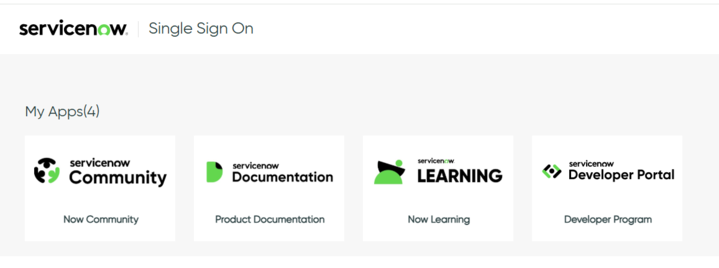
2. Click on the **Developer Program** tile under the **My Apps** menu.
3. Click **Start Building** if prompted. This will appear if this is your first time logging in to the Developer Portal.
4. Find the hostname for your ServiceNow instance. This would be the part of the URL that appears before the first / . For example, in a URL that reads as `dev12345.service-now.com/abc123/4567` , the host name would be `dev12345.service-now.com` .
5. Copy the hostname someplace secure. You'll need this for further steps in Rewst.
6. Navigate to **All > User Administration > Users**.
7. Click **New** to add a new user.
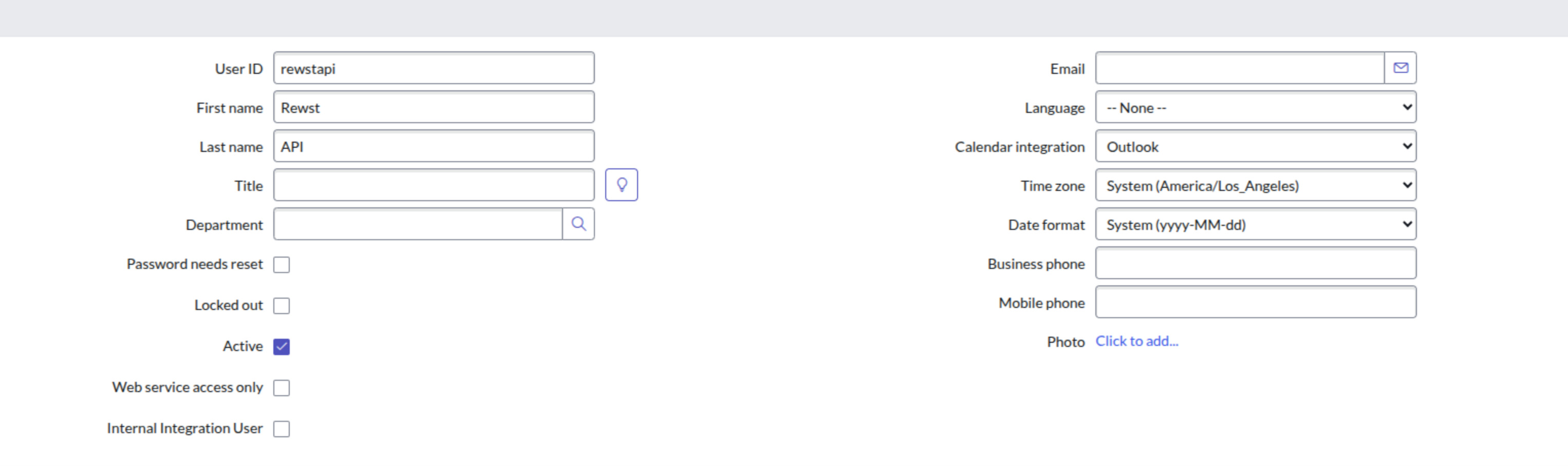
The new user set up page
8. Enter `RewstAPI` into the **User ID** field. Save this information with your hostname. You'll need it for further steps in Rewst.
9. Check the **Active** box.
10. Click **Submit**.
11. Click on the new user that appears in the total user table to re-open its record.
12. Click **Set Password**.
13. Click **Generate** to create a new secure password. Copy this password and save the information with your hostname and username.
14. Click **Save Password**.
### Set up steps in Rewst
1. Navigate to **Integrations** in the left side menu of your Rewst platform.
2. In the Integrations page, search for the `ServiceNow` integration.
3. Click on the integration tile to launch the configuration setup dialog.
4. Choose from either Production or Demo Mode for the setup of your integration:
1. **Production**: Connect with real credentials for live data
2. **Demo Mode**: Explore the integration with simulated mock responses
5. Click **Next: Configure and Authenticate**.
6. Select **+ Create New Credential from the Credential** drop-down selector.
7. Enter the information copied from ServiceNow into the relevant fields:
1. **Hostname**
2. **User Name**
3. **Password**
8. Click **Save Credential**.
9. Click **Next: Confirm**.
10. Click **Install Integration**. The integration will now appear in the top Connected section of your Integrations page.
11. Click on the installed integration. Scroll down to the Org Mappings section of the configuration page and complete organization mapping as needed.
### ServiceNow endpoint plugins
ServiceNow has a limitation which requires you to add the following plugins to your ServiceNow instance for actions to show up and properly work in Rewst. Add these before attempting to use ServiceNow actions in Rewst. Note that the Rewst Agent will not have access to your ServiceNow platform and can't check if you have these installed; setup and installation will be your responsibility. If you were a Rewst Classic customer and set this up for your original integration, the plugins will still work as you previously set them up for your new Rewst integration.
* Customer Service plugin (`com.sn_customerservice`) + `csm_ws_integration` role and is provided within the now namespace
* Order Management for Customer Service Management (`app-csm-order-mgmt`) + `sn_csm_order_mgmt` role
* Order Management for Telecommunications (`sn_ind_tmt_orm`) - Optional
* Telecommunications Assurance Workflows
* Customer Service (`com.sn_customerservice`)
* Customer Service Install Base Management (`com.snc.install_base`)
## ServiceNow Domain Separation in Rewst
{% hint style="info" %}
See ServiceNow's own documentation on Domain Separation [here](https://support.servicenow.com/kb?id=kb_article_view\&sysparm_article=KB0715934).
{% endhint %}
*Domain Separation* in ServiceNow is a way to separate data, processes, and administrative tasks into logical groupings called domains, so that users in one domain cannot see or interact with data in another domain unless explicitly permitted. While the Rewst integration was not explicitly designed for MSPs who use Domain Separation, they can still use Rewst with the ServiceNow integration. Any call or action that can be initiated from ServiceNow can be received by Rewst.
Note that Domain Separated ServiceNow users will need to clone and customize any related Rewst Crates to successfully use them. When using Rewst tasks for ServiceNow, they can be scoped at either the global - parent - level or the domain - child - level. In some actions, you can use the **No Domain** field to add a flag that indicates whether the record search should be restricted to only domains for which the logged-in user is configured.
## Triggers for ServiceNow integration
| Trigger type name | Type | Description |
| ----------------- | ------- | --------------------------------------------------------------- |
| New Table Record | Polling | Trigger which returns an object containing the database records |
{% hint style="success" %}
Got an idea for a new Integration? Rewst is constantly adding new integrations to our integrations page. Submit your idea or upvote existing ideas here in our [Canny feedback collector](https://rewst.canny.io/integrations).
{% endhint %}
---
# Agent Instructions
This documentation is published with GitBook. GitBook is the documentation platform designed so that both humans and AI agents can read, navigate, and reason over technical content effectively. Learn more at gitbook.com.
## Querying This Documentation
If you need additional information that is not directly available in this page, you can query the documentation by asking a question.
Perform an HTTP GET request on the following URL with the `ask` and `goal` query parameters:
```
GET https://docs.rewst.help/rewst-documentation/documentation/integrations/integration-guides/servicenow-integration-setup.md?ask=&goal=
```
`ask` is the immediate question: it should be specific, self-contained, and written in natural language.
`goal` is what the user is ultimately trying to achieve, the reason they need the answer. Sharing it helps GitBook give you a better, more relevant answer. A goal is most helpful when it describes the outcome the user wants rather than restating the question. For example, with `ask=how do I create an API token`, a goal like `automate deployments from our CI pipeline` lets GitBook tailor the answer to that use case.
The response will contain a direct answer to the question and relevant excerpts and sources from the documentation.
Use this mechanism when the answer is not explicitly present in the current page, you need clarification or additional context, or you want to retrieve related documentation sections.