> For the complete documentation index, see [llms.txt](https://docs.rewst.help/llms.txt). Markdown versions of documentation pages are available by appending `.md` to page URLs; this page is available as [Markdown](https://docs.rewst.help/rewst-documentation/documentation/integrations/integration-guides/pax8-integration-setup.md).
# Pax8 integration
This document outlines the requirements and setup for Rewst's Pax8 integration.
{% hint style="info" %}
If you’re new to integrations in Rewst, read through our introductory integration documentation [here](https://docs.rewst.help/documentation/integrations).
Pax8's own documentation on least privileged access can be found [here](https://devx.pax8.com/docs#authentication).
{% endhint %}
## **What does the Pax8 integration do?**
Our Pax8 integration allows MSPs to automate license procurement and billing reconciliation processes. By integrating Pax8 with Rewst, you can streamline operations, reduce manual tasks, and enhance accuracy in billing and license management.
### Why use the Pax8 integration?
* Automate the procurement of licenses for various services.
* Streamline billing reconciliation processes to ensure accurate invoicing.
* Reduce manual data entry and associated errors in license management.
* Enhance operational efficiency by integrating Pax8's offerings into Rewst workflows.
## Integration prerequisites
* An active Pax8 partner account with administrative privileges
* Access to the Rewst platform with administrative rights
* Ensure that your Pax8 account is set up for API access
## Set up the Pax8 integration
{% hint style="info" %}
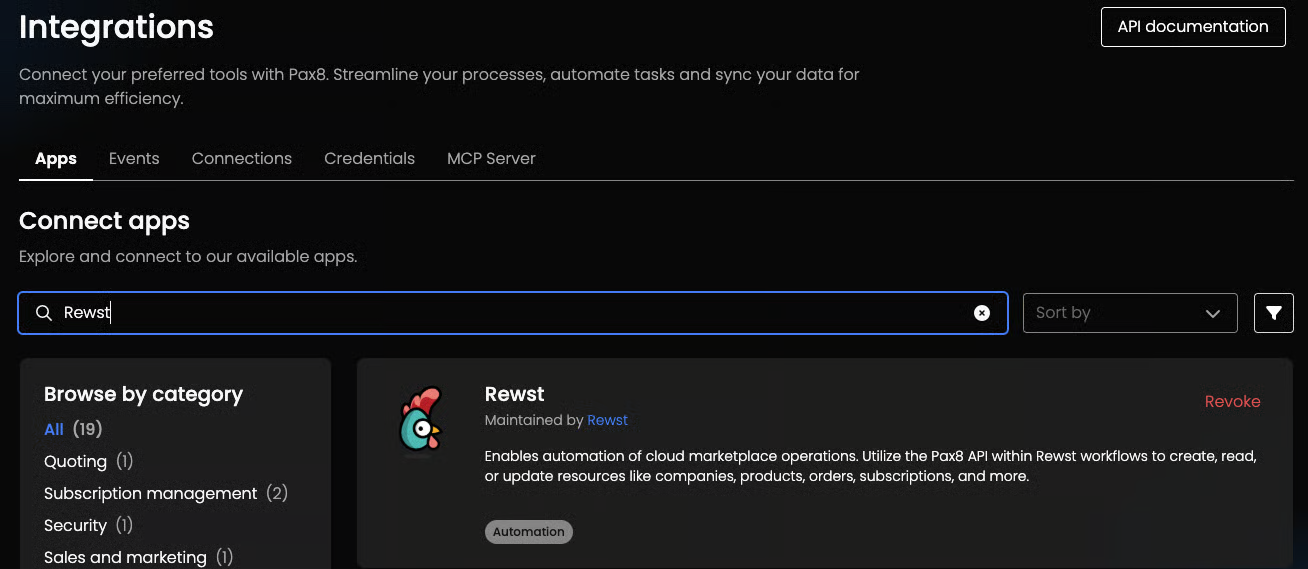
Once further Rewst set up steps are completed, you'll be able to see Rewst as an integrated app in Pax8 by navigating to **Settings > Integrations > Apps** and searching for `Rewst` from the total app list.
{% endhint %}
### Set up steps in Rewst
1. Navigate to **Integrations** in the left side menu of your Rewst platform.
2. In the Integrations page, search for the `Pax8` integration.
3. Click on the integration tile to launch the configuration setup dialog.
4. Choose from either Production or Demo Mode for the setup of your integration:
1. **Production**: Connect with real credentials for live data
2. **Demo Mode**: Explore the integration with simulated mock responses
5. Click **Next: Configure and Authenticate**.
6. Select **+ Create New Credential from the Credential** drop-down selector. No information is required from Pax8 to create the credential.
7. Click **Save Credential**.
8. Click **Authorize**. This will launch a dialog to log in to Pax8. Complete login and authorization in this dialog.
9. Return to the Rewst platform.
10. Click **Next: Confirm**.
11. Click **Install Integration**. The integration will now appear in the top Connected section of your Integrations page.
{% hint style="success" %}
Got an idea for a new Integration? Rewst is constantly adding new integrations to our integrations page. Submit your idea or upvote existing ideas here in our [Canny feedback collector](https://rewst.canny.io/integrations).
{% endhint %}
---
# Agent Instructions
This documentation is published with GitBook. GitBook is the documentation platform designed so that both humans and AI agents can read, navigate, and reason over technical content effectively. Learn more at gitbook.com.
## Querying This Documentation
If you need additional information that is not directly available in this page, you can query the documentation by asking a question.
Perform an HTTP GET request on the following URL with the `ask` and `goal` query parameters:
```
GET https://docs.rewst.help/rewst-documentation/documentation/integrations/integration-guides/pax8-integration-setup.md?ask=&goal=
```
`ask` is the immediate question: it should be specific, self-contained, and written in natural language.
`goal` is what the user is ultimately trying to achieve, the reason they need the answer. Sharing it helps GitBook give you a better, more relevant answer. A goal is most helpful when it describes the outcome the user wants rather than restating the question. For example, with `ask=how do I create an API token`, a goal like `automate deployments from our CI pipeline` lets GitBook tailor the answer to that use case.
The response will contain a direct answer to the question and relevant excerpts and sources from the documentation.
Use this mechanism when the answer is not explicitly present in the current page, you need clarification or additional context, or you want to retrieve related documentation sections.