> For the complete documentation index, see [llms.txt](https://docs.rewst.help/llms.txt). Markdown versions of documentation pages are available by appending `.md` to page URLs; this page is available as [Markdown](https://docs.rewst.help/documentation/integrations/integration-guides/servicenow-integration-setup.md).
# ServiceNow integration
{% hint style="info" %}
If you’re new to integrations in Rewst, read through our introductory integration documentation [here](https://docs.rewst.help/documentation/integrations).
{% endhint %}
## What does the ServiceNow integration do?
Our ServiceNow integration enables the automation of IT service management and business processes. Use the ServiceNow API within Rewst workflows to create and update incidents, manage change requests, retrieve and modify user information, and streamline approval processes.
## Set up the ServiceNow integration
{% hint style="info" %}
A developer instance of ServiceNow is not required to set up the Rewst integration, but is available from ServiceNow for safe testing of Rewst workflows against their application before connecting a regular production environment to Rewst. If you wish to safely test before fully deploying the integration, use the developer instance first, then reinstall the integration on your production instance.
{% endhint %}
### Set up steps in ServiceNow
{% hint style="info" %}
If your account has MFA enabled, the ServiceNow API will ignore this requirement. It will not interfere with the integration.
{% endhint %}
1. Navigate to **All > User Administration > Users**.
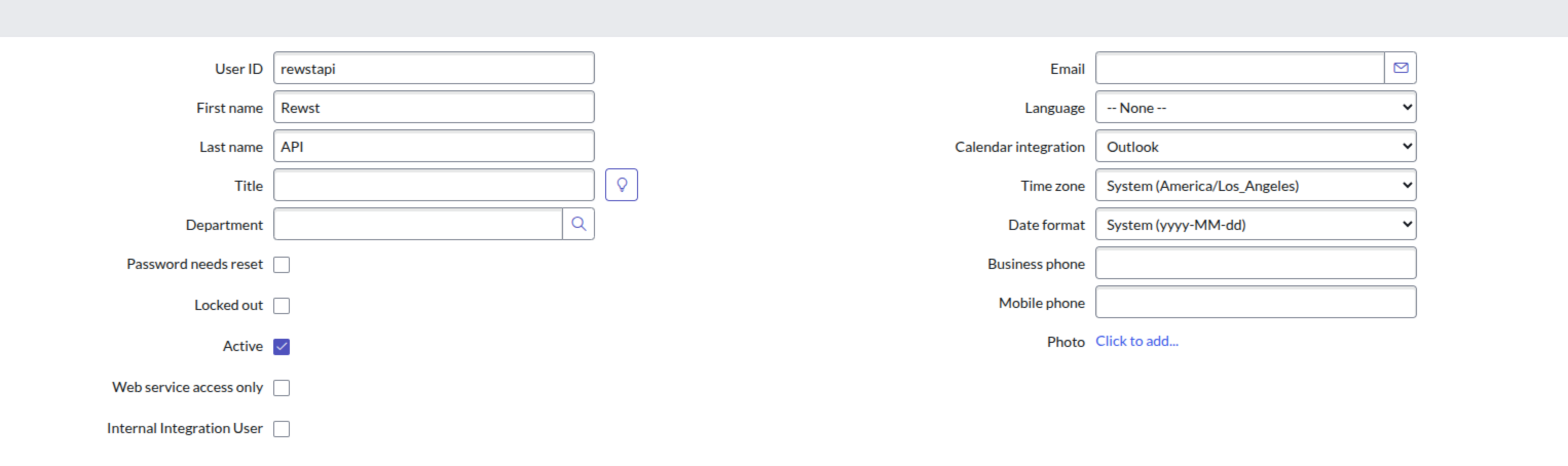
2. Click **New** to add a new user.
The new user set up page
3. Enter `RewstAPI` into the **User ID** field. Save this information with your hostname. You'll need it for further steps in Rewst.
4. Check the **Active** box.
5. Click **Submit**.
6. Click on the new user that appears in the total user table to re-open its record.
7. Click **Set Password**.
8. Click **Generate** to create a new secure password. Copy this password and save the information with your hostname and username. The hostname of your ServiceNow instance should exclude the protocol — e.g. `example.service-now.com`.
9. Click **Save Password**.
### Set up steps in Rewst
1. Navigate to **Marketplace > Integrations** in the left side menu of your Rewst platform.
2. Search for `ServiceNow` in the integrations page.\
\

3. Click on the integration tile to launch the configuration setup page.
4. Under **Parameters**, enter the information you copied out of ServiceNow into the relevant fields:
1. **Hostname**
2. **Password**
3. **User Name**
5. Click **Save Configuration**.
6. Rewst will do a quick validation of your input. Once completed, you'll see a new section beneath the configuration form for[ organization mapping](https://docs.rewst.help/documentation/integrations#what-is-organization-mapping). Complete your mapping as desired.
### Additional ServiceNow steps
Several of the ServiceNow endpoints require you to set up plugins for them to work for the Rewst integration.
1. Navigate to **All > System Definition > Plugins** in your ServiceNow instance.
2. Search for the below listed plugins and install them.
1. Customer Service plugin (com.sn\_customerservice) and csm\_ws\_integration role and is provided within the now namespace.
2. Order Management for Customer Service Management (app-csm-order-mgmt) and sn\_csm\_order\_mgmt role.
3. Order Management for Telecommunications (sn\_ind\_tmt\_orm) - Optional
4. Telecommunications Assurance Workflows
5. Customer Service (com.sn\_customerservice)
6. Customer Service Install Base Management (com.snc.install\_base)
{% hint style="success" %}
Got an idea for a new Integration? Rewst is constantly adding new integrations to our integrations page. Submit your idea or upvote existing ideas here in our [Canny feedback collector](https://rewst.canny.io/integrations).
{% endhint %}
## ServiceNow Domain Separation in Rewst
{% hint style="info" %}
See ServiceNow's own documentation on Domain Separation [here](https://support.servicenow.com/kb?id=kb_article_view\&sysparm_article=KB0715934).
{% endhint %}
*Domain Separation* in ServiceNow is a way to separate data, processes, and administrative tasks into logical groupings called domains, so that users in one domain cannot see or interact with data in another domain unless explicitly permitted. This shouldn't be confused with [multi-instance integration](/documentation/integrations/multi-instance-integration.md), which is a way of setting up integrations that is specific to Rewst. While the Rewst integration was not explicitly designed for MSPs who use Domain Separation, they can still use Rewst with the ServiceNow integration. Any call or action that can be initiated from ServiceNow can be received by Rewst.
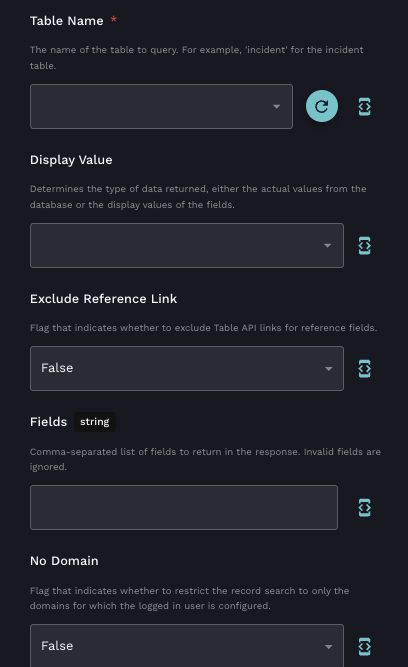
Note that Domain Separated ServiceNow users will need to [clone and customize](/documentation/crates.md#synced-versus-unsynced-crates) any related Rewst Crates to successfully use them. When using Rewst tasks for ServiceNow, they can be scoped at either the global - parent - level or the domain - child - level. In some tasks, you can use the **No Domain** field to add a flag that indicates whether the record search should be restricted to only domains for which the logged-in user is configured.
An example of a task with the No Domain field
## Troubleshoot the ServiceNow integration
If every Basic authorization call returns a 401 with a Bearer challenge regardless of account configuration:
* Check to see if you have a REST API Access Policy on your instance titled "Table GET API Access Policy" that restricted the Table API to OAuth Inbound only.
* This is ServiceNow Yokohama-era behavior on instances that have adopted API access policies. Since the Rewst connector only supports Basic auth, you'll need to add a Basic Auth inbound authentication profile to the relevant Table API policies (GET and POST), scoped with an IP filter restricting it to Rewst's published UK egress IPs as a compensating control.
## Triggers for ServiceNow integration
| Trigger type name | Type | Description |
| ----------------- | ------- | --------------------------------------------------------------- |
| New Table Record | Polling | Trigger which returns an object containing the database records |
## Actions and endpoints
{% hint style="info" %}
For more on how actions work in Rewst, check out our [introductory actions documentation here](https://docs.rewst.help/documentation/workflows/actions-in-rewst).
{% endhint %}
These endpoints requires the following plugins:
* Customer Service plugin (`com.sn_customerservice`) + `csm_ws_integration` role and is provided within the now namespace
* Order Management for Customer Service Management (`app-csm-order-mgmt`) + `sn_csm_order_mgmt` role
* Order Management for Telecommunications (`sn_ind_tmt_orm`) - Optional
* Telecommunications Assurance Workflows
* Customer Service (`com.sn_customerservice`)
* Customer Service Install Base Management (`com.snc.install_base`)
| category | action | description |
| ------------------- | ---------------------------------------------- | -------------------------------------------------------------------------------------------------------------------------------------------------------------------------------------- |
| Account | List Accounts | Retrieves a specified set of Customer Service Management (CSM) accounts. |
| Account | Get Account by ID | Retrieves the specified Customer Service Management (CSM) account. |
| Consumer | List Consumers | Retrieves a specified set of Customer Service Management (CSM) consumer records. |
| Consumer | Get Consumer by ID | Retrieves the specified Customer Service Management (CSM) consumer record. |
| Consumer | Create New Consumer | Creates a new Customer Service Management (CSM) consumer. |
| Contact | Create New Contact | Creates a new Customer Service Management (CSM) contact. |
| Contact | Get Contact by ID | Retrieves the specified Customer Service Management (CSM) contact. |
| Contact | List Contacts | Retrieves a specified set of Customer Service Management (CSM) contacts. |
| Generic Request | Generic API Request | Generic action for making authenticated requests against the ServiceNow API |
| Order | List Product Order | Retrieves all product orders |
| Order | Create New Order | Creates a new order with line items and characteristics. |
| Order | Get Service Order | Retrieves specific service orders |
| Order | Update Service Order | Update specific service order |
| Order | Create Service Order | create new service order |
| Order | Update Customer Order | Updates the specified customer order. |
| Order | Cancel Customer Order | Cancel the specified customer order. |
| Order | List Product Order by ID | Retrieves the specified product order. |
| Order | List Service Orders | Retrieves all service orders |
| Order | Get Order by ID | Retrieves complete order details by specifying the sys\_id or order number. |
| Order | Cancel Service Order | Cancel the specified service order. |
| Order | Create Customer Order | Creates the specified customer order. |
| Service Catalog | Display Value | Returns the display value of the specified variable. |
| Service Catalog | Submit Order | Checks out the user cart, based on the current check-out type (one-step or two-step ). |
| Service Catalog | Process Checkout | Retrieves and processes the checkout for the current cart based on whether the two-step checkout process is enabled. |
| Service Catalog | List Catalogs | Retrieves a list of catalogs to which the user has access based on the passed in parameters. |
| Service Catalog | Get Item Detail from Wish List | Retrieves the details of the specified item stored in the wish list cart. |
| Service Catalog | Submit Record Producer | Creates a record and returns the Table API relative path and redirect URL to access the created record. |
| Service Catalog | List Items Needed by Order Guide | Retrieves a list of items based on the needs described for an order guide. |
| Service Catalog | Delete Cart | Deletes a specified cart and the contents of the cart. |
| Service Catalog | List Wish List Items - Current User | Retrieves the list of items in the logged in user's wish list. |
| Service Catalog | Get Catalog Item by ID | Retrieves a specified catalog item. |
| Service Catalog | Add Item to Wish List | Adds the specified item to the wish list cart. |
| Service Catalog | Delete Item from Cart | Deletes the specified item from the current cart. |
| Service Catalog | Get Catalog Information | Retrieves the available information for a specified catalog. |
| Service Catalog | List Catalog Items | Retrieves a list of catalog items based on the specified parameters. |
| Service Catalog | Update Item in Cart | Updates the specified item in the logged in user's cart. |
| Service Catalog | Verify User Acquisition Rights to Catalog Item | Verifies whether the specified delegated user has acquisition rights to the specified service catalog item. |
| Service Catalog | Add Item to Cart | Adds the specified item to the cart of the current user. |
| Service Catalog | List Users with sUndelegated Item Request | Returns a list of users whose request for the specified item cannot be delegated (requested by another user.) Can call before Add to Cart or Order Now |
| Service Catalog | Order Item | Orders the specified catalog item. |
| Service Catalog | Get Shipping Address by User ID | Retrieves the shipping address of the specified user based on the glide.sc.req\_for.roles property and the default behavior configured in the glide.sc.req\_for.roles.defaultproperty. |
| Service Catalog | Get Contents for Checkout | Retrieves an array of contents requested for checkout. |
| Service Catalog | List Categories by Catalog | Retrieves the list of available categories for the specified catalog. |
| Service Catalog | Get Cart\_Content | Retrieves the details of the items within the logged in user's cart. |
| Service Catalog | Get Category Information | Retrieves the available information for a specified category. |
| Table | List Table Records | Retrieves multiple records for the specified table. |
| Table | List Database Tables | Retrieves the list of tables for the ServiceNow instance. |
| Trouble Ticket Open | Create Trouble Ticket | Creates a record in the Case \[sn\_customerservice\_case] or Incident \[incident] table. |
| Trouble Ticket Open | List All Trouble Tickets | Retrieves a list of all trouble ticket records from the Case \[sn\_customerservice\_case] and Incident \[incident] tables. |
| Trouble Ticket Open | Update Trouble Ticket by ID | Updates a specified record in the Case \[sn\_customerservice\_case] or Incident \[incident] table. |
| Trouble Ticket Open | Get Trouble Ticket by ID | Retrieves a specified record from the Case \[sn\_customerservice\_case] or Incident \[incident] table. |
| Uncategorized | Get Catalog Items List | Retrieves a list of catalog items based on the specified parameters. |
| Uncategorized | Get Contacts | Retrieves a specified set of Customer Service Management (CSM) contacts. |
| Uncategorized | Get Wish List - Current User | Retrieves the list of items in the logged in user's wish list. |
| Uncategorized | Get Accounts | Retrieves a specified set of Customer Service Management (CSM) accounts. |
| Uncategorized | Get List of Categories by Catalog | Retrieves the list of available categories for the specified catalog. |
| Uncategorized | Get Consumers | Retrieves a specified set of Customer Service Management (CSM) consumer records. |
| Uncategorized | Get All Trouble Tickets | Retrieves a list of all trouble ticket records from the Case \[sn\_customerservice\_case] and Incident \[incident] tables. |
| Uncategorized | Get Users Undelegated Item Request | Returns a list of users whose request for the specified item cannot be delegated (requested by another user.) Can call before Add to Cart or Order Now |
| Uncategorized | Verify User Acquisition Rights to Catalog Item | Verifies whether the specified delegated user has acquisition rights to the specified service catalog item. |
| Uncategorized | Add Item to Wish List | Adds the specified item to the wish list cart. |
| Uncategorized | Get Cart | Retrieves the details of the items within the logged in user's cart. |
| Uncategorized | Get List of Catalogs | Retrieves a list of catalogs to which the user has access based on the passed in parameters. |
| Uncategorized | Get Items by Order Guide | Retrieves a list of items based on the needs described for an order guide. |
---
# Agent Instructions
This documentation is published with GitBook. GitBook is the documentation platform designed so that both humans and AI agents can read, navigate, and reason over technical content effectively. Learn more at gitbook.com.
## Querying This Documentation
If you need additional information that is not directly available in this page, you can query the documentation by asking a question.
Perform an HTTP GET request on the following URL with the `ask` and `goal` query parameters:
```
GET https://docs.rewst.help/documentation/integrations/integration-guides/servicenow-integration-setup.md?ask=&goal=
```
`ask` is the immediate question: it should be specific, self-contained, and written in natural language.
`goal` is what the user is ultimately trying to achieve, the reason they need the answer. Sharing it helps GitBook give you a better, more relevant answer. A goal is most helpful when it describes the outcome the user wants rather than restating the question. For example, with `ask=how do I create an API token`, a goal like `automate deployments from our CI pipeline` lets GitBook tailor the answer to that use case.
The response will contain a direct answer to the question and relevant excerpts and sources from the documentation.
Use this mechanism when the answer is not explicitly present in the current page, you need clarification or additional context, or you want to retrieve related documentation sections.