> For the complete documentation index, see [llms.txt](https://docs.rewst.help/llms.txt). Markdown versions of documentation pages are available by appending `.md` to page URLs; this page is available as [Markdown](https://docs.rewst.help/documentation/integrations/integration-guides/senteon-integration.md).
# Senteon integration
{% hint style="info" %}
If you’re new to integrations in Rewst, read through our introductory integration documentation [here](https://docs.rewst.help/documentation/integrations).
{% endhint %}
## What does the Senteon integration do?
Our Senteon integration enables the automation of Senteon's endpoint hardening platform. Use the Senteon API within Rewst workflows to monitor endpoint compliance status, manage configuration drift alarms, retrieve tenant and endpoint data, and automate security hardening validation for continuous compliance monitoring and Zero Trust policy enforcement.
### Why use the Senteon integration?
* Automatically pull compliance scores and status for all managed endpoints to populate SIEM dashboards, ensuring you can prove "Clean Health" to auditors without manual exports.
* Trigger immediate incidents in your SOC (Blumira/Huntress) when a security setting is changed on a mission-critical server.
* Ingest Senteon’s endpoint inventory into your CMDB or SIEM to identify stale or undocumented devices that haven't checked in.
* Cross-reference EDR alerts like a SentinelOne threat with Senteon hardening data to see if a specific misconfiguration allowed the threat to execute.
## Set up the Senteon integration
### Set up steps in Senteon
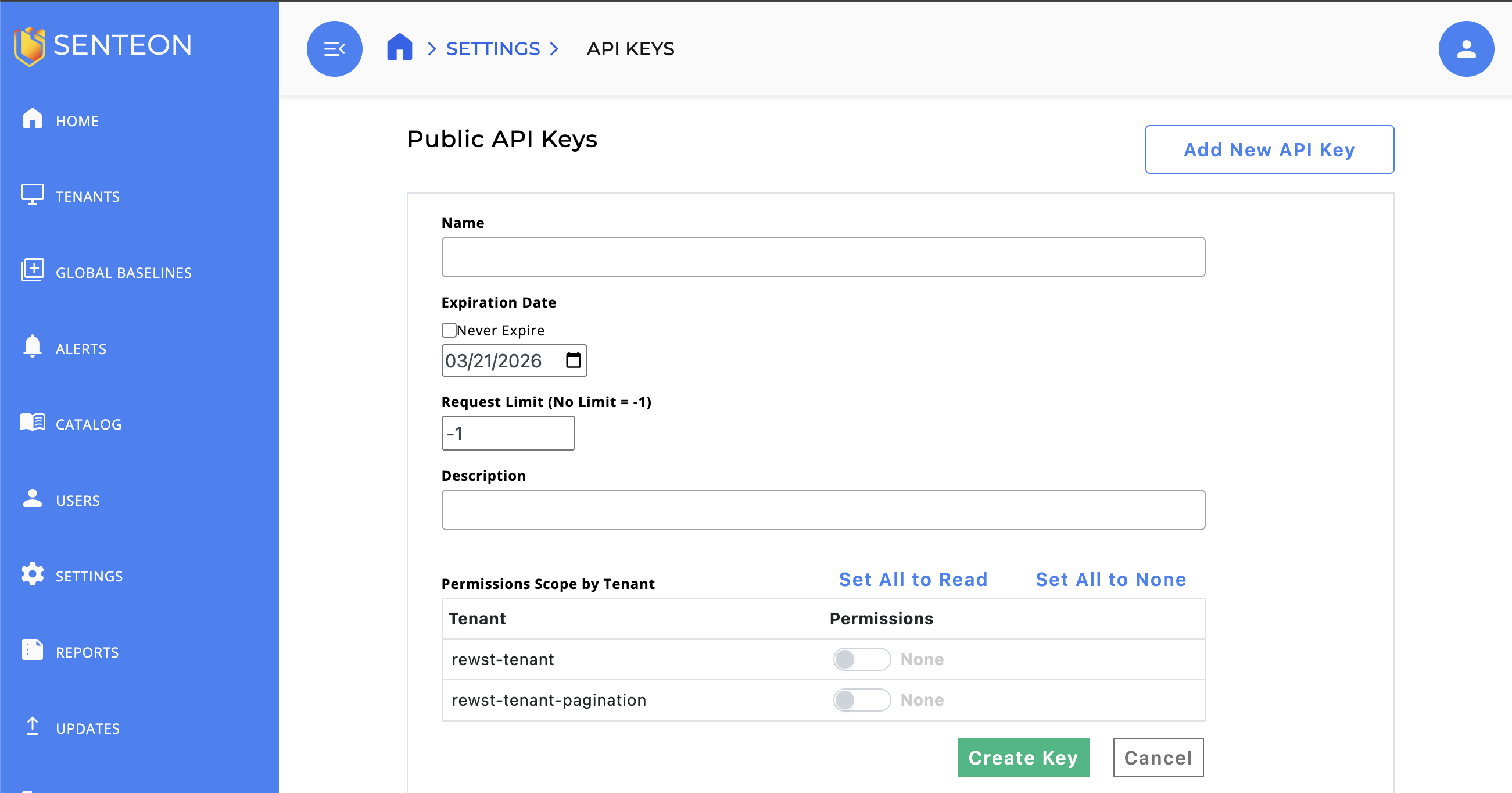
1. Log in to your Senteon Command Center
2. Navigate to **Settings > API Keys > Manage API Keys**.
3. Click **Add New API Key**.
4. Enter `Rewst` into the **Name** field.
5. Check the **Never Expire** box to ensure that your API Key will work for the Rewst integration indefinitely.
6. Toggle **Permissions** to enabled for all tenants that you wish to manage in Rewst.
7. Click **Create Key**.
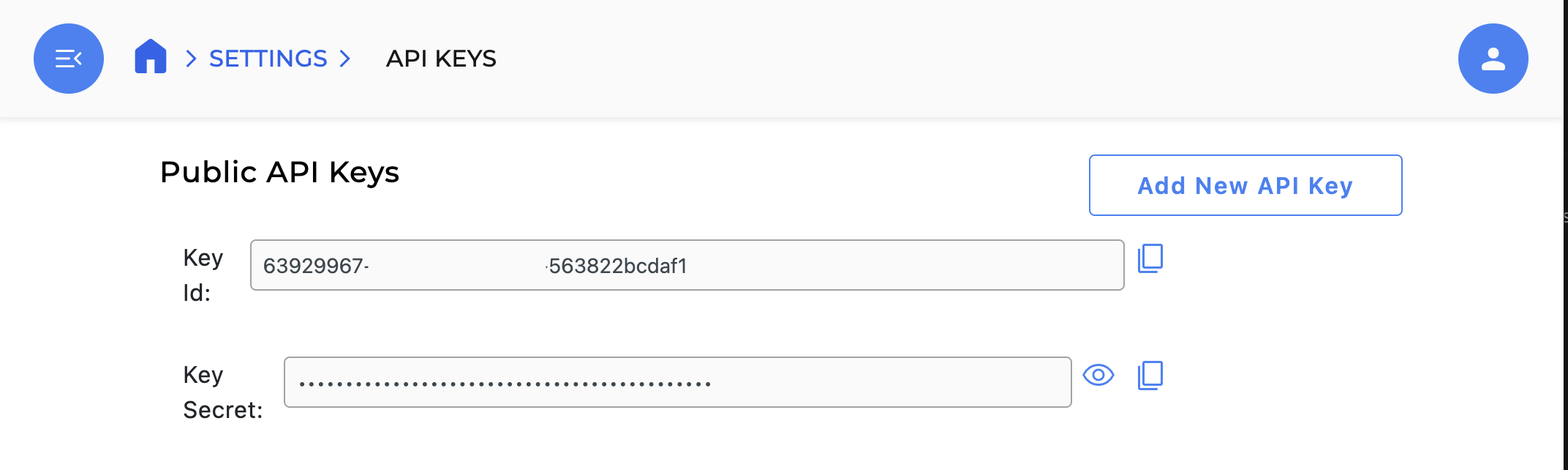
8. Copy your generated **Key ID** and **Key Secret**. Note that the token will only be displayed once, and cannot be retrieved once the dialog is closed. Store these values somewhere secure. You'll need both for the rest of the set up steps in Rewst.
### Set up steps in Rewst
1. Navigate to **Marketplace > Integrations** in the left side menu of your Rewst platform.
2. In the integrations page, search for the `Senteon` integration.\
\

3. Click on the integration tile to launch the configuration setup page.
4. Paste the **Key ID** and **Key Secret** copied from Senteon into the relevant fields.
5. Click **Save Configuration**.
6. Rewst will do a quick validation of your input. Once completed, you'll see a new section beneath the configuration form for [organization mapping](https://docs.rewst.help/documentation/integrations#what-is-organization-mapping). Complete your mapping as desired.
## Test the integration
Saving your configuration during integration setup automatically triggers a test API call to verify that your setup is correct. If something is wrong with your credentials and the integration fails, you'll receive an error message in the Rewst platform.
{% hint style="success" %}
Got an idea for a new integration? Rewst is constantly adding new integrations to our integrations page. Submit your idea or upvote existing ideas here in our [Canny feedback collector](https://rewst.canny.io/integrations).
{% endhint %}
## Senteon integration actions and endpoints
{% hint style="info" %}
For more on how actions work in Rewst, check out our [introductory actions documentation here](https://docs.rewst.help/documentation/workflows/actions-in-rewst).
{% endhint %}
Senteon's complete API documentation can be found [here](https://docs.senteon.co/alarms-apis).
| Category | Action | Description |
| ----------------- | ----------------------------------- | -------------------------------------------------------------------------------------------------------------------------------------------------------------------------------------------------------------------------------------------------------- |
| Account Endpoints | List Account EndPoints | Inputs parsing as GUIDs are treated as UIDs; others as names. When filtering baselines by name, also filter by tenant since names are tenant-scoped. This API does not write EndpointProfile, BaselineGroup, or ExceptionGroup. |
| Account Endpoints | List Account Endpoints by Host Name | Endpoint HostNames are not unique, so this API can return more than one object, up to a maximum of 1000. This request will fail if the caller does not have View permission for any of the endpoints with the specified name. |
| Account Endpoints | Get Account Endpoint | While this API returns a list of endpoints, there will only ever be exactly 1 endpoint in that list. |
| Agents | Get Agent Evaluation | Gets the Evaluation Data retrieved from the agent installed on the endpoint. Requires View permissions for the tenant the given endpoint resides in. |
| Agents | Get Agent Compliance | Gets the Compliance Data retrieved from the agent installed on the endpoint. Requires View permissions for the tenant the given endpoint resides in. |
| Alarms | List Alarms | Only alarms in tenants that the client has permission to view will be returned. For all parameters that can be specified by a name or UID, the API will assume the argument is a UID if it can be parsed into one, otherwise it will treat it as a name. |
| Endpoint Groups | List Baseline Groups | Get all Baseline Groups matching the optional criteria. |
| Endpoint Groups | List Baseline Templates | Gets all Baseline Templates matching the optional criteria. |
| Tenants | List Tenants | Gets a list of all Ids and Names of Tenants within your Organization. |
| Tenants | Get Tenant By Name | Gets detailed information about endpoint status counts for a given tenant. |
| Tenants | Get Tenant | Gets detailed information about endpoint status counts for a given tenant. |
---
# Agent Instructions
This documentation is published with GitBook. GitBook is the documentation platform designed so that both humans and AI agents can read, navigate, and reason over technical content effectively. Learn more at gitbook.com.
## Querying This Documentation
If you need additional information that is not directly available in this page, you can query the documentation by asking a question.
Perform an HTTP GET request on the following URL with the `ask` and `goal` query parameters:
```
GET https://docs.rewst.help/documentation/integrations/integration-guides/senteon-integration.md?ask=&goal=
```
`ask` is the immediate question: it should be specific, self-contained, and written in natural language.
`goal` is what the user is ultimately trying to achieve, the reason they need the answer. Sharing it helps GitBook give you a better, more relevant answer. A goal is most helpful when it describes the outcome the user wants rather than restating the question. For example, with `ask=how do I create an API token`, a goal like `automate deployments from our CI pipeline` lets GitBook tailor the answer to that use case.
The response will contain a direct answer to the question and relevant excerpts and sources from the documentation.
Use this mechanism when the answer is not explicitly present in the current page, you need clarification or additional context, or you want to retrieve related documentation sections.