# Pax8 integration

{% hint style="info" %}
If you’re new to integrations in Rewst, read through our introductory integration documentation [here](https://docs.rewst.help/documentation/integrations).

Pax8's own documentation on least privileged access can be found [here](https://devx.pax8.com/docs#authentication).&#x20;
{% endhint %}

## **What does the Pax8 integration do?**

Our Pax8 integration allows MSPs to automate license procurement and billing reconciliation processes. By integrating Pax8 with Rewst, you can streamline operations, reduce manual tasks, and enhance accuracy in billing and license management.

### Why use the Pax8 integration?

* Automate the procurement of licenses for various services.
* Streamline billing reconciliation processes to ensure accurate invoicing.
* Reduce manual data entry and associated errors in license management.
* Enhance operational efficiency by integrating Pax8's offerings into Rewst workflows.

## Integration prerequisites

* An active Pax8 partner account with administrative privileges
* Access to the Rewst platform with administrative rights
* Ensure that your Pax8 account is set up for API access

## Set up the Pax8 integration

### Set up steps in Pax8

1. Log in to your Pax8 partner account.
2. If required, generate an API access token. Refer to Pax8's [API documentation](https://devx.pax8.com/) for detailed instructions.
3. Navigate to **Settings > Integrations > Credentials**.\
   \
   ![](https://1835401289-files.gitbook.io/~/files/v0/b/gitbook-x-prod.appspot.com/o/spaces%2FAQQ1EHVcEsGKBPVHmiav%2Fuploads%2F0u2hHraFFp9qXQMmeiLN%2FScreenshot%202025-08-13%20at%2010.38.41%E2%80%AFAM.png?alt=media\&token=841259a9-a73c-4c70-9c74-900b4483f148)
4. Click **+ Create API credential**.
5. Enter `Rewst` into the **Name** field.\
   \
   ![](https://1835401289-files.gitbook.io/~/files/v0/b/gitbook-x-prod.appspot.com/o/spaces%2FAQQ1EHVcEsGKBPVHmiav%2Fuploads%2FLSj382pOKdvFJc5BirpV%2FScreenshot%202025-08-13%20at%2010.45.24%E2%80%AFAM.png?alt=media\&token=9ee5fa53-4e4b-443c-8db1-1329c4dd1c14)
6. Click **Create**. You’ll see a green confirmation dialog appear in the top right corner of your screen.
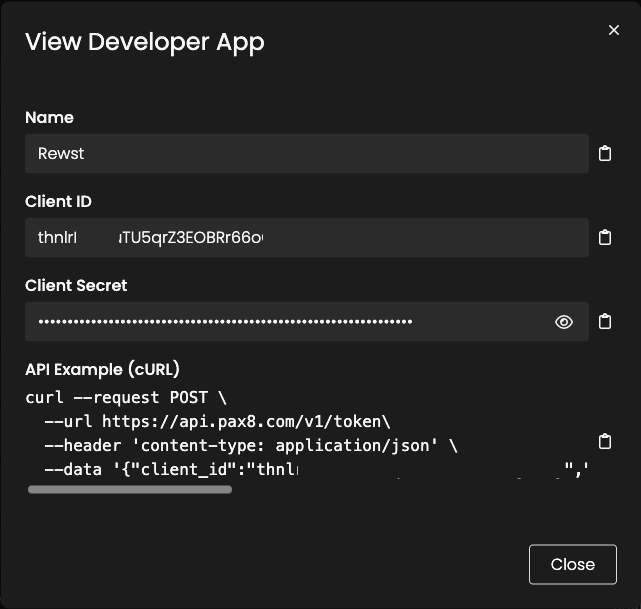
7. Click ![](https://1835401289-files.gitbook.io/~/files/v0/b/gitbook-x-prod.appspot.com/o/spaces%2FAQQ1EHVcEsGKBPVHmiav%2Fuploads%2FgGTCuNDmvlH6VOfoQUH2%2FScreenshot%202025-08-13%20at%2010.49.47%E2%80%AFAM.png?alt=media\&token=91a19d2a-f28d-4cb3-b193-e51d824b28c0) to the right of your newly created credential to open the **View Developer App** dialog.
8. Copy the Client ID and Client Secret for the credential and store them somewhere secure. You’ll need both for further setup steps in Rewst.

<figure><img src="https://1835401289-files.gitbook.io/~/files/v0/b/gitbook-x-prod.appspot.com/o/spaces%2FAQQ1EHVcEsGKBPVHmiav%2Fuploads%2Ft9zNpwNkKIv8M3RZfvDz%2FScreenshot%202025-08-13%20at%2010.47.20%E2%80%AFAM.png?alt=media&#x26;token=bb6da2aa-9441-4324-b10a-64a9fbb6a782" alt=""><figcaption></figcaption></figure>

{% hint style="info" %}
Once further Rewst set up steps are completed, you'll be able to see Rewst as an integrated app in Pax8 by navigating to **Settings > Integrations > Apps** and searching for `Rewst` from the total app list.<br>

<p align="center"><img src="https://1835401289-files.gitbook.io/~/files/v0/b/gitbook-x-prod.appspot.com/o/spaces%2FAQQ1EHVcEsGKBPVHmiav%2Fuploads%2F0qOttY6WPiScMa97lDfr%2Fimage.png?alt=media&#x26;token=22e1e3be-b2b1-4e3b-8cb4-f129936c570c" alt=""></p>
{% endhint %}

### Set up steps in Rewst

1. Navigate to **Marketplace > Integrations** in the left side menu of your Rewst platform.
2. In the Integrations page, search for the `Pax8` integration.\
   \
   ![](https://1835401289-files.gitbook.io/~/files/v0/b/gitbook-x-prod.appspot.com/o/spaces%2FAQQ1EHVcEsGKBPVHmiav%2Fuploads%2FTh7v8DGVSHx1UxjAPPRR%2Fimage%20\(27\).png?alt=media\&token=9c5e66aa-5b19-4b21-8143-8745f57d9983)
3. Click on the integration tile to launch setup.
4. Enter your copied **Client ID** and **Client Secret** into their relevant fields.
5. Leave **Is Default** checked to on.
6. Click the **Authorize** button.
7. If prompted, log in to your Pax8 account by entering your username, password, and one-time code.
8. Accept the authorization request. You'll know that the integration was successfully installed if you now see an option to **ReAuthorize**.
9. Click **Save Configuration**.
10. Rewst will do a quick validation of your input. Once completed, you'll see a new section beneath the configuration form for[ organization mapping](https://docs.rewst.help/documentation/integrations#what-is-organization-mapping). Complete your mapping as desired. \ <br>

    <figure><img src="https://1835401289-files.gitbook.io/~/files/v0/b/gitbook-x-prod.appspot.com/o/spaces%2FAQQ1EHVcEsGKBPVHmiav%2Fuploads%2FrFB4LULccd0Oa8oGQhAX%2Fimage%20(32).png?alt=media&#x26;token=68c9be75-af42-41e8-817d-3aca62aa9e5d" alt=""><figcaption></figcaption></figure>

## Test the Integration

1. After completing the setup, create a test workflow in Rewst that utilizes a Pax8 action, such as retrieving a list of licenses.\ <br>

   <figure><img src="https://1835401289-files.gitbook.io/~/files/v0/b/gitbook-x-prod.appspot.com/o/spaces%2FAQQ1EHVcEsGKBPVHmiav%2Fuploads%2FdKDuYwCjh9Uglu15UAVK%2Fimage%20(34).png?alt=media&#x26;token=8a42c384-b049-420c-a69c-21c6592b2bc0" alt=""><figcaption><p>An example of what your test workflow might look like</p></figcaption></figure>
2. Run the workflow and verify that it successfully interacts with your Pax8 account, confirming that the integration is functioning correctly.

{% hint style="success" %}
Got an idea for a new Integration? Rewst is constantly adding new integrations to our integrations page. Submit your idea or upvote existing ideas here in our [Canny feedback collector](https://rewst.canny.io/integrations).
{% endhint %}

## Crates related to the Pax8 integration

<table data-view="cards"><thead><tr><th></th><th data-hidden data-card-target data-type="content-ref"></th><th data-hidden data-card-cover data-type="image">Cover image</th></tr></thead><tbody><tr><td><strong>Microsoft: User Onboarding</strong></td><td><a href="../../crates/existing-crate-documentation/microsoft-user-onboarding-crate-v2">microsoft-user-onboarding-crate-v2</a></td><td><a href="https://1835401289-files.gitbook.io/~/files/v0/b/gitbook-x-prod.appspot.com/o/spaces%2FAQQ1EHVcEsGKBPVHmiav%2Fuploads%2F4l0LJOlWFFr3rra7ZG2x%2FScreenshot%202025-11-13%20at%203.06.37%E2%80%AFPM.png?alt=media&#x26;token=70e3b548-b081-4ce7-8c62-87aa56f1ce41">Screenshot 2025-11-13 at 3.06.37 PM.png</a></td></tr><tr><td><strong>Microsoft: User Offboarding</strong></td><td><a href="../../crates/existing-crate-documentation/microsoft-user-offboarding-crate">microsoft-user-offboarding-crate</a></td><td><a href="https://1835401289-files.gitbook.io/~/files/v0/b/gitbook-x-prod.appspot.com/o/spaces%2FAQQ1EHVcEsGKBPVHmiav%2Fuploads%2F6JzH7CVeAGjS6RDz2owe%2FScreenshot%202025-11-13%20at%203.06.23%E2%80%AFPM.png?alt=media&#x26;token=ec6e0e8f-4ae8-4c44-b3dc-21ca1f106342">Screenshot 2025-11-13 at 3.06.23 PM.png</a></td></tr><tr><td><strong>Alert on Unused M365 Licenses</strong></td><td><a href="../../crates/existing-crate-documentation/alert-on-unused-m365-licenses-crate">alert-on-unused-m365-licenses-crate</a></td><td><a href="https://1835401289-files.gitbook.io/~/files/v0/b/gitbook-x-prod.appspot.com/o/spaces%2FAQQ1EHVcEsGKBPVHmiav%2Fuploads%2FstFuwMtkMAuSVHJuMOV9%2FScreenshot%202025-11-13%20at%203.05.54%E2%80%AFPM.png?alt=media&#x26;token=b9a54c8d-ad22-47d1-ab4b-67e6d01e7cef">Screenshot 2025-11-13 at 3.05.54 PM.png</a></td></tr></tbody></table>

## Troubleshoot the **Pax8** integration

### **Authorization Issues**

If you encounter problems during authorization, ensure that your Pax8 credentials are correct and that your account has the necessary API access permissions.

### **API Connection Errors**

Verify that there are no network issues preventing Rewst from connecting to Pax8's API endpoints.

### **Data Retrieval Problems**

Ensure that the data you are trying to access in Pax8 exists and that your account has the appropriate permissions to retrieve it.

## Pax8 actions and endpoints

{% hint style="info" %}
For more on how actions work in Rewst, check out our [introductory actions documentation here](https://docs.rewst.help/documentation/workflows/actions-in-rewst).
{% endhint %}

Ensure that you have the necessary permissions and correct endpoint URLs as specified in Pax8's [API documentation](https://devx.pax8.com/docs/introduction) when configuring these actions.

| Action Name                   | Description                                                                                                                                                                        | Endpoint Related to Action                                                                                                                                                  |
| ----------------------------- | ---------------------------------------------------------------------------------------------------------------------------------------------------------------------------------- | --------------------------------------------------------------------------------------------------------------------------------------------------------------------------- |
| Cancel subscription           | Cancels the Subscription specified by subscriptionId                                                                                                                               | <p>DELETE<br><a href="https://api.pax8.com/v1/subscriptions/%7BsubscriptionId%7D"><https://api.pax8.com/v1/subscriptions/{subscriptionId}></a></p>                          |
| Create Company                | Creates a new Company. The Company will be placed in an “inactive” status until the Company has primary Contacts added. Once contacts are added, the company will move to “active” | <p>POST<br><a href="https://api.pax8.com/v1/companies"><https://api.pax8.com/v1/companies></a></p>                                                                          |
| Create order                  | Create a new order. Currently NOT supported for scheduled orders (orders with a future date)                                                                                       | <p>POST<br><a href="https://api.pax8.com/v1/orders"><https://api.pax8.com/v1/orders></a></p>                                                                                |
| Get company                   | Returns a single company record matching the companyId you specify                                                                                                                 | <p>GET<br><a href="https://api.pax8.com/v1/companies/%7BcompanyId%7D"><https://api.pax8.com/v1/companies/{companyId}></a></p>                                               |
| Get company contact           | Returns a contact matching the companyId and contactId you specify                                                                                                                 | <p>GET<br><a href="https://api.pax8.com/v1/companies/%7BcompanyId%7D/contacts/%7BcontactId%7D"><https://api.pax8.com/v1/companies/{companyId}/contacts/{contactId}></a></p> |
| Get order                     | Returns the Order record specified by OrderId. Currently NOT supported for scheduled orders (orders with a future date).                                                           | <p>GET<br><a href="https://api.pax8.com/v1/orders/%7BorderId%7D"><https://api.pax8.com/v1/orders/{orderId}></a></p>                                                         |
| Get product                   | Returns only the product record for the productId you specify                                                                                                                      | <p>GET<br><a href="https://api.pax8.com/v1/products/%7BproductId%7D"><https://api.pax8.com/v1/products/{productId}></a></p>                                                 |
| Get product provision details | Returns provisioning details for the specified productId. Provisioning details for a product are dynamic data.                                                                     | <p>GET<br><a href="https://api.pax8.com/v1/products/%7BproductId%7D/provision-details"><https://api.pax8.com/v1/products/{productId}/provision-details></a></p>             |
| Get subscription              | Returns the Subscription record specified by the subscriptionId                                                                                                                    | <p>GET<br><a href="https://api.pax8.com/v1/subscriptions/%7BsubscriptionId%7D"><https://api.pax8.com/v1/subscriptions/{subscriptionId}></a></p>                             |
| List companies                | Returns a paginated list of all your companies filtered by optional parameters                                                                                                     | <p>GET<br><a href="https://api.pax8.com/v1/companies"><https://api.pax8.com/v1/companies></a></p>                                                                           |
| List company contacts         | Returns a paginated list of contacts ordered by createDate descending                                                                                                              | <p>GET<br><a href="https://api.pax8.com/v1/companies/%7BcompanyId%7D/contacts"><https://api.pax8.com/v1/companies/{companyId}/contacts></a></p>                             |
| List orders                   | Returns a paginated list of orders. Currently NOT supported for scheduled orders(orders with a future date).                                                                       | <p>GET<br><a href="https://api.pax8.com/v1/orders"><https://api.pax8.com/v1/orders></a></p>                                                                                 |
| List products                 | Returns a paginated list of Pax8 products filtered by optional query parameters                                                                                                    | <p>GET<br><a href="https://api.pax8.com/v1/products"><https://api.pax8.com/v1/products></a></p>                                                                             |
| List subscriptions            | Fetch a paginated list of subscriptions. Default page is 0 and default size is 10. The maximum page size is 200                                                                    | <p>GET<br><a href="https://api.pax8.com/v1/subscriptions"><https://api.pax8.com/v1/subscriptions></a></p>                                                                   |
| Update subscription           | Updates a subscription. Currently NOT supported for subscriptions with a future date.                                                                                              | <p>PUT<br><a href="https://api.pax8.com/v1/subscriptions/%7BsubscriptionId%7D"><https://api.pax8.com/v1/subscriptions/{subscriptionId}></a></p>                             |

{% hint style="info" %}
Got an idea for a new Integration? Rewst is constantly adding new integrations to our integrations page. Submit your idea or upvote existing ideas here in our [Canny feedback collector](https://rewst.canny.io/integrations).
{% endhint %}

## Pax8 2025 OAuth transition planning

{% hint style="info" %}
Our team expects the OAuth changes will be released on December 21, 2024. Follow the steps below to complete your transition. Note that while new Rewst customers won't need to provision the client ID and secret from Pax8, existing customers will still be able to view this information in Rewst for a portion of 2025 as our total OAuth transition concludes.
{% endhint %}

### Customer transition instructions

1. Update the configuration in the Rewst platform:
   1. Navigate to **Configuration > Integrations**.
   2. Select **Pax8**.
   3. In the **Parameters** section, under **OAuth Configuration**, select the **Authorize** button.
2. If you’re logged out of Pax8, you’ll be taken to the Pax8 login screen. Enter your username, password, and one-time code.
   1. Once OAuth is authorized, you’ll see a **success** message.
   2. The OAuth button will change to **Re-Authorize**.

{% file src="<https://1835401289-files.gitbook.io/~/files/v0/b/gitbook-x-prod.appspot.com/o/spaces%2FAQQ1EHVcEsGKBPVHmiav%2Fuploads%2FUFKvVHqBG1mo1oSycv0I%2FPax%208%20OAuth.mp4?alt=media&token=ca6e2eff-f618-40c2-bbd6-5931dabd2bc5>" %}
This quick video shows step two of the process, where you’ll log in to Pax8 and authorize OAuth.
{% endfile %}

### Pax8 Transition FAQs

#### Why do we need to switch to OAuth 2.0?

Pax8 is driving the transition to OAuth 2.0 to enhance the security of customer integrations and align with industry standards for secure authorization. OAuth 2.0 allows applications to access resources without exposing user credentials, providing a more secure and reliable method for authentication. To ensure uninterrupted service, all customers must authenticate using OAuth 2.0 before January 31, 2025. This change reflects Pax8’s commitment to protecting your data and maintaining a seamless integration experience.

#### Are there any steps needed on the Pax8 side?

Rewst utilizes Pax8’s Delegated Authorization to access Pax8’s Public APIs on your behalf. During the authorization process, you’ll be prompted to log into Pax8 to grant necessary permissions. No additional configuration is required within Pax8. Note that if you have both a vendor and a partner account in Pax8, you’ll need to log in with the partner login.

#### What happens after January 31, 2025 if I don’t switch to OAuth2.0?

If you don't switch to OAuth 2.0 by January 31, 2025, Pax 8 will block API key authentication requests. This means your integration will no longer be able to authenticate, and you won't be able to utilize Rewst’s Pax 8 integration. To ensure uninterrupted service, please make the switch to OAuth 2.0 before the deadline.
