> For the complete documentation index, see [llms.txt](https://docs.rewst.help/llms.txt). Markdown versions of documentation pages are available by appending `.md` to page URLs; this page is available as [Markdown](https://docs.rewst.help/documentation/integrations/integration-guides/nodeware-integration.md).
# Nodeware integration
{% hint style="info" %}
If you’re new to integrations in Rewst, read through our introductory integration documentation [here](https://docs.rewst.help/documentation/integrations).
{% endhint %}
## What does the Nodeware integration do?
Our Nodeware integration enhances automation capabilities in network vulnerability management. Automatically identify, prioritize, and remediate security vulnerabilities across networks, and access vulnerability reporting from within your PSA.
## Set up the Nodeware integration
### Set up steps in Nodeware
1. Log in to your Nodeware account.
2. Click on **Reports** in the left side menu.
3. Copy the **API Key,** displayed in the lower right corner. You'll need this value to authenticate your API calls.\

### Set up steps in Rewst
1. Navigate to **Marketplace > Integrations** in the left side menu of your Rewst platform.
2. In the Integrations page, search for the Nodeware integration.\

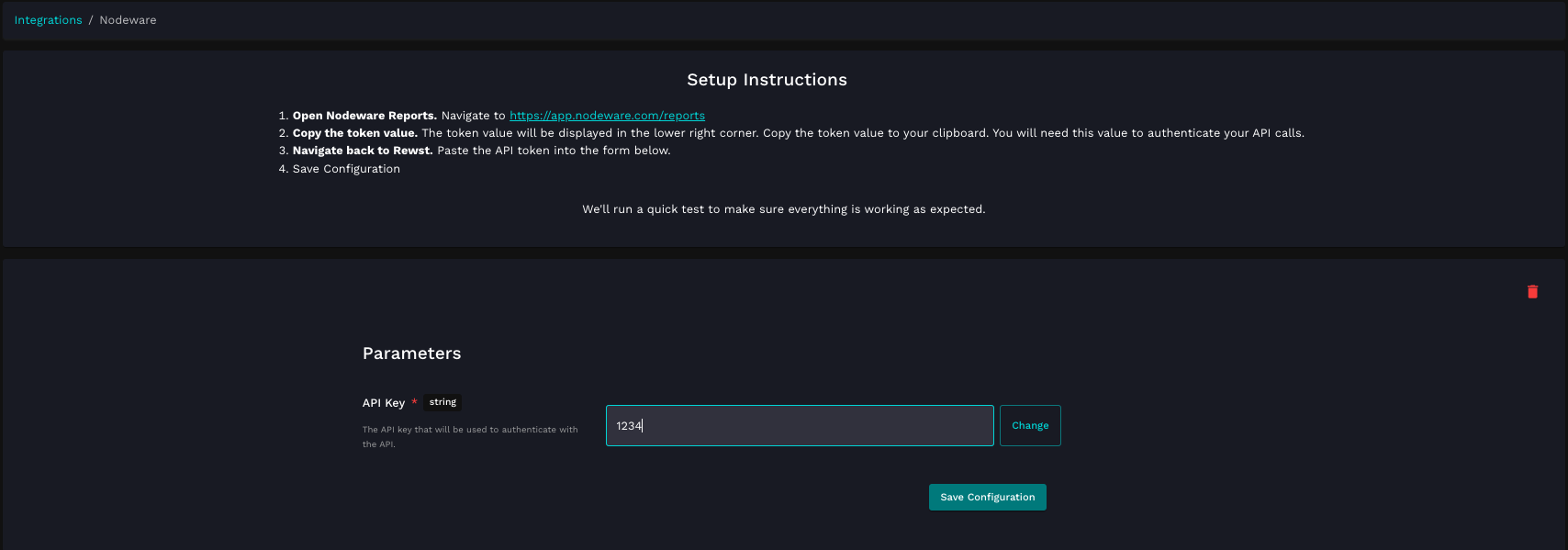
3. Paste the API key copied from Nodeware into the **API Key** field of the form.
4. Click **Save Configuration**.
5. Rewst will do a quick validation of your input. Once completed, you'll see a new section beneath the configuration form for[ organization mapping](https://docs.rewst.help/documentation/integrations#what-is-organization-mapping). Complete your mapping as desired.
## Test the Integration
Saving your configuration during integration setup automatically triggers a test API call to verify that your setup is correct. If something is wrong with your credentials and the integration fails, you'll receive an error message in the Rewst platform.
The error message, shown when the Nodeware integration configuration fails
{% hint style="success" %}
Got an idea for a new Integration? Rewst is constantly adding new integrations to our integrations page. Submit your idea or upvote existing ideas here in our [Canny feedback collector](https://rewst.canny.io/integrations).
{% endhint %}
## Nodeware actions and endpoints
{% hint style="info" %}
For more on how actions work in Rewst, check out our [introductory actions documentation here](https://docs.rewst.help/documentation/workflows/actions-in-rewst).
{% endhint %}
Nodeware's complete documentation can be found [here](https://api.nodeware.com/api/msp/).
| Category | Action | Description |
| ------------------- | ----------------------------------- | ------------------------------------------------------------------------------------------------------------------------------------ |
| **Alerts** | Get All Alerts For a Customer | Returns a list of alerts given a specific `customer_token` |
| **Assets** | Get an Asset | Returns a single asset, internal or external, given the `uuid` |
| | Delete An External Asset | Deletes an external asset, given the `uuid` |
| | Update An Asset | Update a single asset given the `uuid` |
| | Rescan An Asset | Request a rescan for an Asset, given the `uuid` |
| | Asset CVE Data | Get information about CVEs discovered on an Asset, given the `uuid` |
| | Apply Credentials To An Asset | Apply Credentials to an Asset, given the `uuid`, to enable credentialed scanning |
| | Clear Credentials For An Asset | Remove credentials for an Asset, given the `uuid`, to disable credentialed scanning |
| | Decommission An Asset | Decommission an asset no longer in use and optionally provide justification |
| | Pause Or Unpause Scanning For Asset | Pause vulnerability scans for an Asset, or resume vulnerability scans if already paused |
| | Get All Assets For a Customer | Returns all assets for a given customer by `customer_token` |
| | Add An External Asset | Adds an external asset, or assets, for a given customer by `customer_token` |
| **Credentials** | Get All Credentials | Get all credentials for a given customer by `customer_token` |
| | Delete a Credential | Remove a credential given the `uuid`. Credentials cannot be modified, only deleted and re-created |
| | List All Benchmarks | List all Benchmarks that can be run against an Asset during a Credentialed Scan. A benchmark must match the asset’s operating system |
| **Customers** | Get All Customers | Returns all customers |
| | Add a Customer | None |
| | Get a Customer | Gets a single customer given the `customer_token` |
| | Delete a Customer | Deletes a customer, given the `customer_token`, and any related data. THIS ACTION CANNOT BE UNDONE |
| | Update a Customer | Update a single customer given the `customer_token` |
| **Downloads** | Get Sensor And Agent Download Links | Returns an object with links to install files for Sensors and Agents |
| **Generic Request** | Nodeware API Request | Generic action for making authenticated requests against the Nodeware API |
| **Reports** | Get Available Report Types | Returns list of available report formats |
| **Reports** | Generate a Report For a Customer | Returns generation status message |
| | Retrieve a Report | Returns download link for specific report given a `customer_token`, `report_id`, and `format` |
| | Delete a Report | Returns status of report deletion, given a `customer_token` and `report_id` to be deleted |
| **Sensors** | Get a Sensor | Gets a single sensor given the `uuid` |
| | Update a Sensor | Configures a sensor given the `uuid` |
| | Get All Sensors | Gets all sensors for a customer given the `customer_token` |
| | Connect a Sensor | Connect a sensor using a 4 character connect code |
| | Activate a Sensor | Activate a sensor given the uu`id` |
| | Deactivate a Sensor | Deactivate a sensor given the `uuid` |
| | Disconnect a Sensor | Disconnect a sensor given the `uuid` from the customer it’s currently associated to |
---
# Agent Instructions
This documentation is published with GitBook. GitBook is the documentation platform designed so that both humans and AI agents can read, navigate, and reason over technical content effectively. Learn more at gitbook.com.
## Querying This Documentation
If you need additional information that is not directly available in this page, you can query the documentation by asking a question.
Perform an HTTP GET request on the following URL with the `ask` and `goal` query parameters:
```
GET https://docs.rewst.help/documentation/integrations/integration-guides/nodeware-integration.md?ask=&goal=
```
`ask` is the immediate question: it should be specific, self-contained, and written in natural language.
`goal` is what the user is ultimately trying to achieve, the reason they need the answer. Sharing it helps GitBook give you a better, more relevant answer. A goal is most helpful when it describes the outcome the user wants rather than restating the question. For example, with `ask=how do I create an API token`, a goal like `automate deployments from our CI pipeline` lets GitBook tailor the answer to that use case.
The response will contain a direct answer to the question and relevant excerpts and sources from the documentation.
Use this mechanism when the answer is not explicitly present in the current page, you need clarification or additional context, or you want to retrieve related documentation sections.