# Hudu integration

{% hint style="info" %}
If you’re new to integrations in Rewst, read through our introductory integration documentation [here](https://docs.rewst.help/documentation/integrations).
{% endhint %}

## What does the Hudu integration do?

Rewst's Hudu integration enables the automation of documentation management. Use the Hudu API within Rewst workflows to perform actions such as managing and documenting assets, websites, passwords, and procedures.

* Document Microsoft environment
* Document Rewst form URLs
* Document Microsoft shared mailboxes
* Document Microsoft user details
* Document Microsoft group details

## Set up the Hudu integration

### Set up steps in Hudu

1. Log in to your Hudu instance.
2. Click on the **Admin** tab in the top menu.
3. Scroll down and click **API Keys** under the **Account Administration** menu.\ <br>

   <figure><img src="https://1835401289-files.gitbook.io/~/files/v0/b/gitbook-x-prod.appspot.com/o/spaces%2FAQQ1EHVcEsGKBPVHmiav%2Fuploads%2FGdy4SAsFlqJyW00dSOSx%2FScreenshot%202025-04-14%20at%202.30.36%E2%80%AFPM.png?alt=media&#x26;token=748847d4-8ff0-488b-a1d1-b148c518d3da" alt=""><figcaption></figcaption></figure>
4. Click **+ New API Key** at the upper right of the page.
5. Enter or select the following:

   1. **Name:** Rewst
   2. **Limit scope to:**&#x20;
   3. **Allowed IP Addresses:** View Rewst IPs [here](https://docs.rewst.help/security/security-policy)
   4. Check the box for **View passwords**
   5. Check the box for **Delete data**
   6. Check the box for **Export data**

   <figure><img src="https://1835401289-files.gitbook.io/~/files/v0/b/gitbook-x-prod.appspot.com/o/spaces%2FAQQ1EHVcEsGKBPVHmiav%2Fuploads%2FHkWAOLgw7q0lX60abZQF%2FScreenshot%202025-04-14%20at%202.36.13%E2%80%AFPM.png?alt=media&#x26;token=15b0b2b6-ef91-4a9c-97b4-b42aef909158" alt=""><figcaption></figcaption></figure>
6. Click **Create**.
7. Copy and save the API key that is generated and listed at the top of the page under **New API Key**.

## Set up steps in Rewst

1. Navigate to **Marketplace > Integrations** in the left side menu of your Rewst platform.
2. In the integrations page, search for `Hudu`.\
   \
   ![](https://1835401289-files.gitbook.io/~/files/v0/b/gitbook-x-prod.appspot.com/o/spaces%2FAQQ1EHVcEsGKBPVHmiav%2Fuploads%2FwBDaGXWvf36EHFg7ytnD%2FScreenshot%202025-04-14%20at%202.40.46%E2%80%AFPM.png?alt=media\&token=5022b08f-2ef8-476d-a487-e8ec5912efce)
3. Click on the integration tile to begin the installation process.
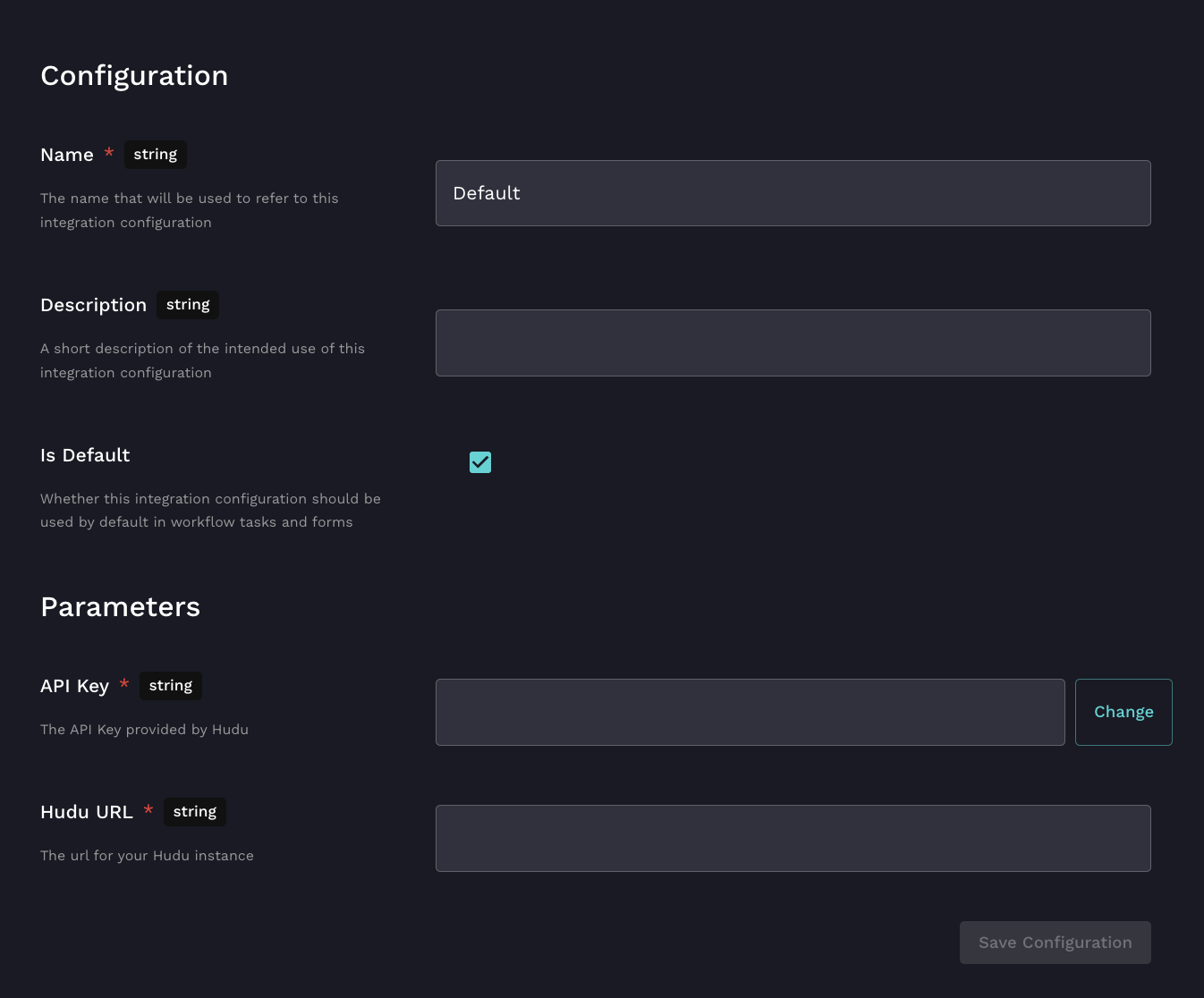
4. Enter the name of your choice for your integration.
5. Enter a description if desired.
6. Enter your copied API key from your Hudu Instance.
7. Add your Hudu Instance hostname in the **Hudu URL** field: for example, `yourinstance.huducloud.com` .
8. Click **Save Configuration**.
9. Rewst will do a quick validation of your input. Once completed, you'll see a new section beneath the configuration form for[ organization mapping](https://docs.rewst.help/documentation/integrations#what-is-organization-mapping). Complete your mapping as desired. <br>

   <figure><img src="https://1835401289-files.gitbook.io/~/files/v0/b/gitbook-x-prod.appspot.com/o/spaces%2FAQQ1EHVcEsGKBPVHmiav%2Fuploads%2F1Hni4SqYemTeW2kTN3BE%2FScreenshot%202025-02-04%20at%202.19.52%E2%80%AFPM.png?alt=media&#x26;token=cb7dcbb3-e89f-4ae9-8c8b-1c65faf12027" alt=""><figcaption></figcaption></figure>

## Test the integration

1. Navigate to **Automations > Workflows**.
2. Click **Create**.
3. Name your workflow, and click **Submit**. Note that after your test, you won't need this workflow, and could delete it if desired.
4. Drag the Hudu action **List Companies** onto your workflow builder canvas.\
   \
   ![](https://1835401289-files.gitbook.io/~/files/v0/b/gitbook-x-prod.appspot.com/o/spaces%2FAQQ1EHVcEsGKBPVHmiav%2Fuploads%2FYgQY8gdvpkt4vR0syzwd%2Fimage%20\(40\).png?alt=media\&token=cecb17d8-79bb-438c-8d41-c7e195ddf3b9)
5. Click **Test**. If the action succeeds, then you’re all set.

{% hint style="success" %}
Got an idea for a new Integration? Rewst is constantly adding new integrations to our integrations page. Submit your idea or upvote existing ideas here in our [Canny feedback collector](https://rewst.canny.io/integrations).
{% endhint %}

## Crates related to the Hudu integration

<table data-view="cards"><thead><tr><th></th><th data-hidden data-card-cover data-type="files"></th></tr></thead><tbody><tr><td><strong>Document M365 Environment</strong></td><td><a href="https://1835401289-files.gitbook.io/~/files/v0/b/gitbook-x-prod.appspot.com/o/spaces%2FAQQ1EHVcEsGKBPVHmiav%2Fuploads%2FAaQBBs77iFr5uosmwaEd%2FDocument%20m365%20environment.png?alt=media&#x26;token=986102a8-5438-4ef5-a3c6-f6a55cc86470">Document m365 environment.png</a></td></tr><tr><td><strong>Document Rewst Form URLs</strong></td><td><a href="https://1835401289-files.gitbook.io/~/files/v0/b/gitbook-x-prod.appspot.com/o/spaces%2FAQQ1EHVcEsGKBPVHmiav%2Fuploads%2FiRk4NIPyO9knZ1LgaWqo%2FDocument%20Rewst%20form%20urls%20it%20glue%20hudu.png?alt=media&#x26;token=cb0c081e-a148-4116-8ef2-bf7fcb36cbf1">Document Rewst form urls it glue hudu.png</a></td></tr><tr><td><strong>Document Shared Mailbox Details</strong></td><td><a href="https://1835401289-files.gitbook.io/~/files/v0/b/gitbook-x-prod.appspot.com/o/spaces%2FAQQ1EHVcEsGKBPVHmiav%2Fuploads%2FKFFjiQ0WhWsK4feXAhqe%2FDocument%20shared%20mailbox%20details.png?alt=media&#x26;token=94b6dcf8-1295-4fa0-a018-3468e14ec5fa">Document shared mailbox details.png</a></td></tr><tr><td><strong>Document Group Details</strong></td><td><a href="https://1835401289-files.gitbook.io/~/files/v0/b/gitbook-x-prod.appspot.com/o/spaces%2FAQQ1EHVcEsGKBPVHmiav%2Fuploads%2FfUqFQaciTTwRivHydwcL%2FDocument%20Group%20Details%20V2.png?alt=media&#x26;token=bdb88f58-0a0e-4ccf-bf76-d1c0b63a9968">Document Group Details V2.png</a></td></tr><tr><td><strong>Document User Details</strong></td><td><a href="https://1835401289-files.gitbook.io/~/files/v0/b/gitbook-x-prod.appspot.com/o/spaces%2FAQQ1EHVcEsGKBPVHmiav%2Fuploads%2FVOV8P88DboO6opJKCfsQ%2FDocument%20user%20details%20v2.png?alt=media&#x26;token=57737ccc-2526-4511-bb07-bd3f0d80ad2a">Document user details v2.png</a></td></tr></tbody></table>

{% hint style="info" %}
Got an idea for a new Integration? Rewst is constantly adding new integrations to our integrations page. Submit your idea or upvote existing ideas here in our [Canny feedback collector](https://rewst.canny.io/integrations).
{% endhint %}

## Hudu actions and endpoints

{% hint style="info" %}
For more on how actions work in Rewst, check out our [introductory actions documentation here](https://docs.rewst.help/documentation/workflows/actions-in-rewst).
{% endhint %}

You can access Hudu’s own API documentation by signing into your Hudu instance with an admin account, and navigating to **Admin > API > Hudu API Documentation**.

| Action Name                      | Description                                      | Endpoint Related to Action |
| -------------------------------- | ------------------------------------------------ | -------------------------- |
| Archive Asset                    | Archive an Asset                                 | /companies                 |
| Archive Company                  | Archive a Company                                | /companies                 |
| Archive Knowledge Base Article   | Archive a Knowledge Base Article                 | /articles                  |
| Archive Password                 | Archive a Password by ID                         | /asset\_passwords          |
| Create Asset for Company         |                                                  | /companies                 |
| Create Asset Layout              |                                                  | /asset\_layouts            |
| Create Company                   |                                                  | /companies                 |
| Create Folder                    |                                                  | /folders                   |
| Create Knowledge Base Article    |                                                  | /articles                  |
| Create or Update Magic Dash Item |                                                  | /magic\_dash               |
| Create Password                  |                                                  | /asset\_passwords          |
| Create Relation                  |                                                  | /relations                 |
| Create Website                   |                                                  | /websites                  |
| Delete Asset                     | Delete an Asset                                  | /companies                 |
| Delete Company                   | Delete a Company                                 | /companies                 |
| Delete Folder                    | Delete a Folder by ID                            | /folders                   |
| Delete Knowledge Base Article    | Delete a Knowledge Base Article                  | /articles                  |
| Delete Magic Dash Item with ID   | Delete a Magic Dash Item with ID                 | /magic\_dash               |
| Delete Password                  | Delete a Password                                | /asset\_passwords          |
| Delete Relation                  | Delete a Relation                                | /relations                 |
| Delete Website                   | Delete a Website                                 | /websites                  |
| Get Asset                        | Get an Asset by ID                               | /companies                 |
| Get Asset Layout                 | Get an Asset Layout by ID                        | /asset\_layouts            |
| Get Company                      | Get a Company by ID                              | /companies                 |
| Get Folder                       | Get a Folder by ID                               | /folders                   |
| Get Knowledge Base Article       | Get a Knowledge Base Article by ID               | /articles                  |
| Get Password                     | Get a Password by ID                             | /asset\_passwords          |
| Get Procedure                    | Get a Procedure (Process) by ID                  | /procedures                |
| Get Website                      | Get a Website by ID                              | /websites                  |
| Hudu API Request                 | Generic Action for Making Authenticated Requests |                            |
| List Activity Logs               | Get Activity Logs for Account                    | /activity\_logs            |
| List All Assets                  | List Assets for All Companies                    | /companies                 |
| List All Relations               | Get a List of All Relations                      | /relations                 |
| List Asset Layouts               | Get a List of Asset Layouts                      | /asset\_layouts            |
| List Companies                   | Get a List of Companies                          | /companies                 |
| List Company Assets              | Get a List of Assets Specific to a Company       | /companies                 |
| List Expirations                 | Get Expirations for Account                      | /expirations               |
| List Folders                     | Get a List of Folders                            | /folders                   |
| List Knowledge Base Articles     | Get a List of Knowledge Base Articles            | /articles                  |
| List Magic Dash Items            | Get all Magic Dash Items                         | /magic\_dash               |
| List Passwords                   | Get a List of Passwords                          | /asset\_passwords          |
| List Procedures (Processes)      | Get a List of Procedures (Processes)             | /procedures                |
| List Websites                    | Get a List of All Websites                       | /websites                  |
| Search Integration Cards         | Lookup Cards with Outside Integration Details    | /cards                     |
| Unarchive Asset                  | Unarchive an Asset                               | /companies                 |
| Unarchive Company                | Unarchive a Company                              | /companies                 |
| Unarchive Knowledge Base Article | Unarchive a Knowledge Base Article               | /articles                  |
| Unarchive Password               | Unarchive a Password by ID                       | /asset\_passwords          |
| Update Asset                     | Update an Asset by ID                            | /companies                 |
| Update Asset Layout              | Update an Asset Layout                           | /asset\_layouts            |
| Update Company                   | Update a Company                                 | /companies                 |
| Update Folder                    | Update a Folder by ID                            | /folders                   |
| Update Knowledge Base Article    | Update a Knowledge Base Article                  | /articles                  |
| Update Password                  | Update a Password by ID                          | /asset\_passwords          |
| Update Website                   | Update a Website by ID                           | /websites                  |
