> For the complete documentation index, see [llms.txt](https://docs.rewst.help/llms.txt). Markdown versions of documentation pages are available by appending `.md` to page URLs; this page is available as [Markdown](https://docs.rewst.help/documentation/integrations/integration-guides/hubspot-integration-setup.md).
# HubSpot integration
{% hint style="info" %}
If you’re new to integrations in Rewst, read through our introductory integration documentation [here](https://docs.rewst.help/documentation/integrations).
{% endhint %}
## What does the HubSpot integration do?
With our HubSpot integration, synchronize data between any other integration and HubSpot, ensuring a unified view of customer interactions, leads, and sales processes.
There are two ways to use HubSpot integration in Rewst.
1. Use the HubSpot app via a public version provided by Rewst. This still integrates into your own personal HubSpot accounts.
2. Use the HubSpot app via a private version of your own HubSpot account. This setup method is more intensive, but offers several benefits:
1. Less likelihood of encountering rate limits
2. Full control of HubSpot scopes
3. Use of the generic HubSpot API Request action, which often requires additional scopes for success
Decide which of these options is best for your desired use of HubSpot, then proceed to the relevant directions below.
{% hint style="success" %}
If you're a Rewst customer who set up their HubSpot integration prior to Rewst's feature update to include two options, you can uninstall and reinstall the HubSpot integration in Rewst to update your integration to the second private option.
{% endhint %}
## Set up the HubSpot integration: Rewst-provided HubSpot app
### Set up steps in Rewst
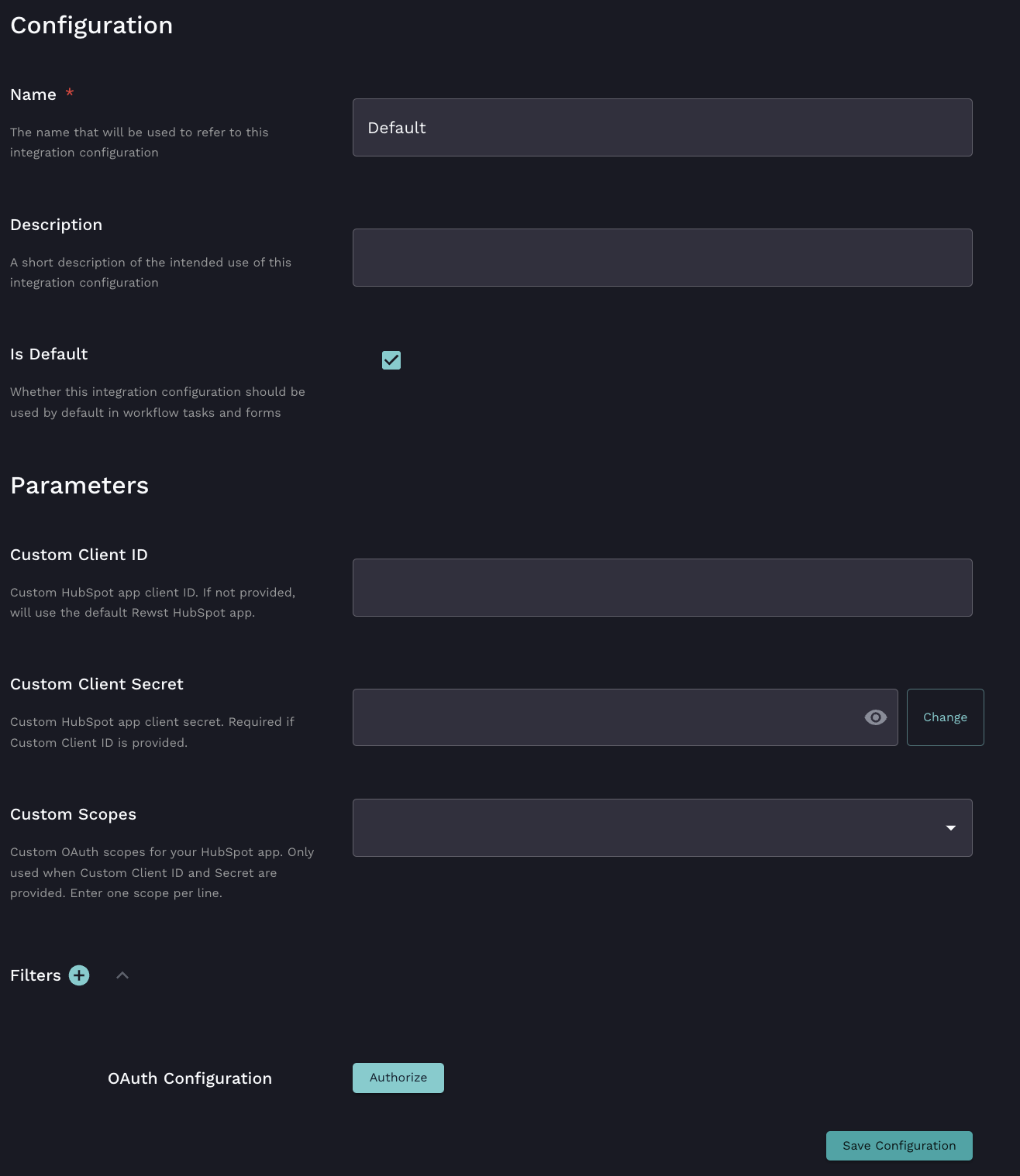
1. Navigate to **Marketplace > Integrations** in the left side menu of your Rewst platform.
2. Search for `HubSpot` in the integrations page.\
3. Click on the integration tile to launch the configuration setup page.
4. Leave the **Client ID** and **Client Secret** fields blank.
5. Click  next to **Filters** to add filter criteria, if desired.
6. Click **Authorize**.
7. Sign in to HubSpot in the dialog that appears. Follow the prompts to complete the authorization.
8. Click **Save Configuration**.
9. Rewst will do a quick validation of your input. Once completed, you'll see a new section beneath the configuration form for[ organization mapping](https://docs.rewst.help/documentation/integrations#what-is-organization-mapping). Complete your mapping as desired.
## Set up the HubSpot integration: Private HubSpot app
### Set up steps in HubSpot
1. Log in to your HubSpot Developer account.
2. Navigate to **Apps** in the left side menu.
3. Click **Create App**.
4. Enter a descriptive name into the **Public App Name** field. Optionally, add a **description.**
5. Click the **Auth** tab.
6. Scroll down the page to the **Redirect URLs** menu. Enter the following, which is the Rewst callback URL: [`http://engine.rewst.io/integrations/hubspot/callback`](http://engine.rewst.io/integrations/hubspot/callback) .
7. Click **Create App**. You should see a confirmation dialog appear at the top of your screen if the app is created successfully.
8. Copy the following information that appears and store it somewhere secure. You'll need it for additional steps in Rewst.
1. **Client ID**
2. **Client Secret**
9. Scroll down to the **Scopes** section of the **Auth** tab.
10. Click **+ Add Scopes**.
11. Search for and add the scopes required for your use case. For example, `crm.objects.contacts.read`, `tickets`, `automation`, etc.
12. Ensure scopes match exactly what you intend to use in Rewst workflows. Requesting unnecessary scopes is not recommended.
13. Make a list of the scopes you chose in a text file. Copy and paste them directly as they appear in HubSpot. You'll need this information for further steps in Rewst.
14. Click **Update** to finalize your selections.
### Set up steps in Rewst
1. Navigate to **Marketplace > Integrations** in the left side menu of your Rewst platform.
2. Search for `HubSpot` in the integrations page.\
3. Click on the integration tile to launch the configuration setup page.
4. Enter the information copied from HubSpot into the relevant fields:
1. **Client ID**
2. **Client Secret**
5. Enter the scopes you chose in HubSpot into the **Scopes** field. Enter one scope per line. The scopes must be a direct match for what was selected in HubSpot.
6. Click  next to **Filters** to add filter criteria, if desired.
7. Click **Authorize**.
8. Sign in to HubSpot in the dialog that appears. Follow the prompts to complete the authorization.
9. Click **Save Configuration**.
10. Rewst will do a quick validation of your input. Once completed, you'll see a new section beneath the configuration form for[ organization mapping](https://docs.rewst.help/documentation/integrations#what-is-organization-mapping). Complete your mapping as desired.
{% hint style="success" %}
Got an idea for a new Integration? Rewst is constantly adding new integrations to our integrations page. Submit your idea or upvote existing ideas here in our [Canny feedback collector](https://rewst.canny.io/integrations).
{% endhint %}
## Troubleshoot the HubSpot integration
#### Verify the Connection
Test the integration by running a simple workflow that calls a HubSpot action
#### Scope mismatch errors
Ensure that the scopes in Rewst match exactly what's listed in your HubSpot app
#### Invalid client error
Double-check your Client ID and Secret for typos or missing characters, compared against what is stored in HubSpot.
#### Redirect URI mismatch
Make sure [`http://engine.rewst.io/integrations/hubspot/callback`](http://engine.rewst.io/integrations/hubspot/callback) is saved in HubSpot before authorizing.
#### Token expiry
Rewst handles token refresh automatically. If issues arise, try re-authorizing the integration.
## Triggers for HubSpot integration
| Trigger type name | Type | Description |
| ----------------- | ------- | ------------------------------------------------------------------------ |
| object\_changed | Webhook | Triggers the workflow on creation, update, or deletion of a HubSpot item |
## Actions and endpoints
{% hint style="info" %}
For more on how actions work in Rewst, check out our [introductory actions documentation here](https://docs.rewst.help/documentation/workflows/actions-in-rewst).
{% endhint %}
{% hint style="warning" %}
HubSpot has optional scopes which aren't included in Rewst's standard integration. If you're using the generic HubSpot API Request action, certain endpoints may return an error where missing scopes and permissions are listed.
If you wish to use the generic HubSpot API Request action, we recommend choosing the private app setup method for HubSpot integration.
HubSpot's documentation on their scopes can be found [here](https://developers.hubspot.com/docs/apps/developer-platform/build-apps/authentication/scopes).
{% endhint %}
HubSpot's own API documentation can be found [here](https://developers.hubspot.com/docs/reference/api/overview).
| Category | Action | Description |
| ------------------- | ------------------------- | ------------------------------------------------------------------------ |
| **Companies** | Search Companies | search companies in hubspot |
| **Companies** | Get Company | get a hubspot company by id |
| **Companies** | Delete Company | delete a company in hubspot |
| **Companies** | Create Company | create a company in hubspot |
| **Companies** | Update Company | update a company in hubspot |
| **Contact Lists** | List Contact Lists | Description coming soon... |
| **Contacts** | Search Contacts | search contacts in hubspot |
| **Contacts** | Get Contact | get a hubspot contact by id |
| **Contacts** | Delete Contact | delete a contact in hubspot |
| **Contacts** | Create Contact | create a contact in hubspot |
| **Contacts** | Update Contact | update a contact in hubspot |
| **Deals** | Search Deals | Search deals in hubspot |
| **Deals** | List Deal Associations | List a HubSpot Deal's associations |
| **Deals** | List Company Associations | List a HubSpot Companies associations |
| **Deals** | Delete Deal | delete a hubspot deal by id |
| **Deals** | Create Deal | create a hubspot deal |
| **Deals** | Update Deal | update a hubspot deal |
| **Generic Request** | HubSpot API Request | Generic action for making authenticated requests against the HubSpot API |
---
# Agent Instructions
This documentation is published with GitBook. GitBook is the documentation platform designed so that both humans and AI agents can read, navigate, and reason over technical content effectively. Learn more at gitbook.com.
## Querying This Documentation
If you need additional information that is not directly available in this page, you can query the documentation by asking a question.
Perform an HTTP GET request on the following URL with the `ask` and `goal` query parameters:
```
GET https://docs.rewst.help/documentation/integrations/integration-guides/hubspot-integration-setup.md?ask=&goal=
```
`ask` is the immediate question: it should be specific, self-contained, and written in natural language.
`goal` is what the user is ultimately trying to achieve, the reason they need the answer. Sharing it helps GitBook give you a better, more relevant answer. A goal is most helpful when it describes the outcome the user wants rather than restating the question. For example, with `ask=how do I create an API token`, a goal like `automate deployments from our CI pipeline` lets GitBook tailor the answer to that use case.
The response will contain a direct answer to the question and relevant excerpts and sources from the documentation.
Use this mechanism when the answer is not explicitly present in the current page, you need clarification or additional context, or you want to retrieve related documentation sections.


 If you wish to use the generic HubSpot API Request action, we recommend choosing the private app setup method for HubSpot integration.
HubSpot's documentation on their scopes can be found [here](https://developers.hubspot.com/docs/apps/developer-platform/build-apps/authentication/scopes).
If you wish to use the generic HubSpot API Request action, we recommend choosing the private app setup method for HubSpot integration.
HubSpot's documentation on their scopes can be found [here](https://developers.hubspot.com/docs/apps/developer-platform/build-apps/authentication/scopes).