> For the complete documentation index, see [llms.txt](https://docs.rewst.help/llms.txt). Markdown versions of documentation pages are available by appending `.md` to page URLs; this page is available as [Markdown](https://docs.rewst.help/documentation/integrations/integration-guides/halo-integration-setup.md).
# HaloPSA integration
{% hint style="info" %}
If you’re new to integrations in Rewst, read through our introductory integration documentation [here](https://docs.rewst.help/documentation/integrations).
{% endhint %}
## What does the HaloPSA integration do?
Our HaloPSA integration provides automation and workflow capabilities by connecting HaloPSA’s IT service management functions with Rewst’s automation platform. This integration allows users to manage and interact with various components of their PSA system directly from Rewst. For example:
* A new support ticket is submitted in HaloPSA. A Rewst workflow can automatically classify the ticket, assign it to the correct team based on predefined criteria, and send an acknowledgment email to the customer.
* When a new asset is assigned to a client, update inventory records. Rewst can capture the asset details and update HaloPSA records, ensuring real-time inventory tracking.
* A new client signs a contract for IT services. Rewst can automatically create the client profile, set up relevant permissions, and initiate onboarding tasks.
## Set up the HaloPSA integration
### Set up steps in HaloPSA
{% hint style="warning" %}
To set up the integration, you must have a Halo administrator account.
{% endhint %}
Before configuring the Rewst integration you must generate an API user. Here is the instruction for the generation of the integration user:
1. Log in to HaloPSA as an Administrator.
2. Navigate to **Configuration > Teams & Agents > Agents .**
3. Click **+New**.\
4. Create an agent for Rewst to use. We suggest naming this user `Rewst API` or similar.
5. Grant the user permissions according to what you would like Rewst to do for you. However, for optimal functionality and reliability of the Halo integration, assign administrator permissions to the service account. We’ve consistently observed higher success rates and fewer connectivity issues when using admin-level access for this integration. While lower permission levels may work in limited scenarios, they often lead to unexpected failures during automated workflows.
6. Click **Save**.
7. Navigate to **Configuration > Advanced > Integrations > HaloPSA API**\
See [Halo Authorization Docs](https://halo.haloservicedesk.com/apidoc/authorisation) here.
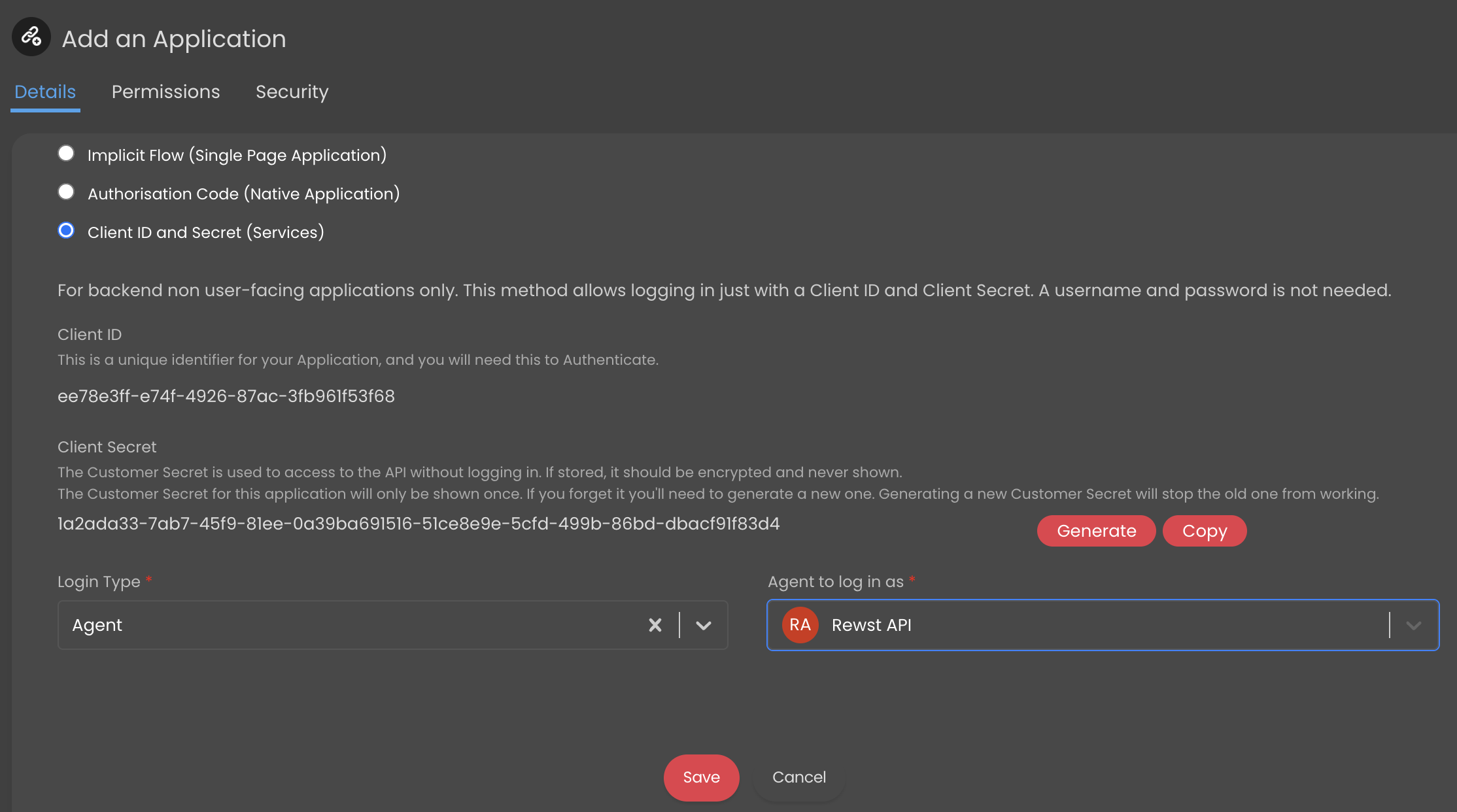
8. Select **View Applications**.
9. Click **+New**.\
10. Name the application `Rewst` .
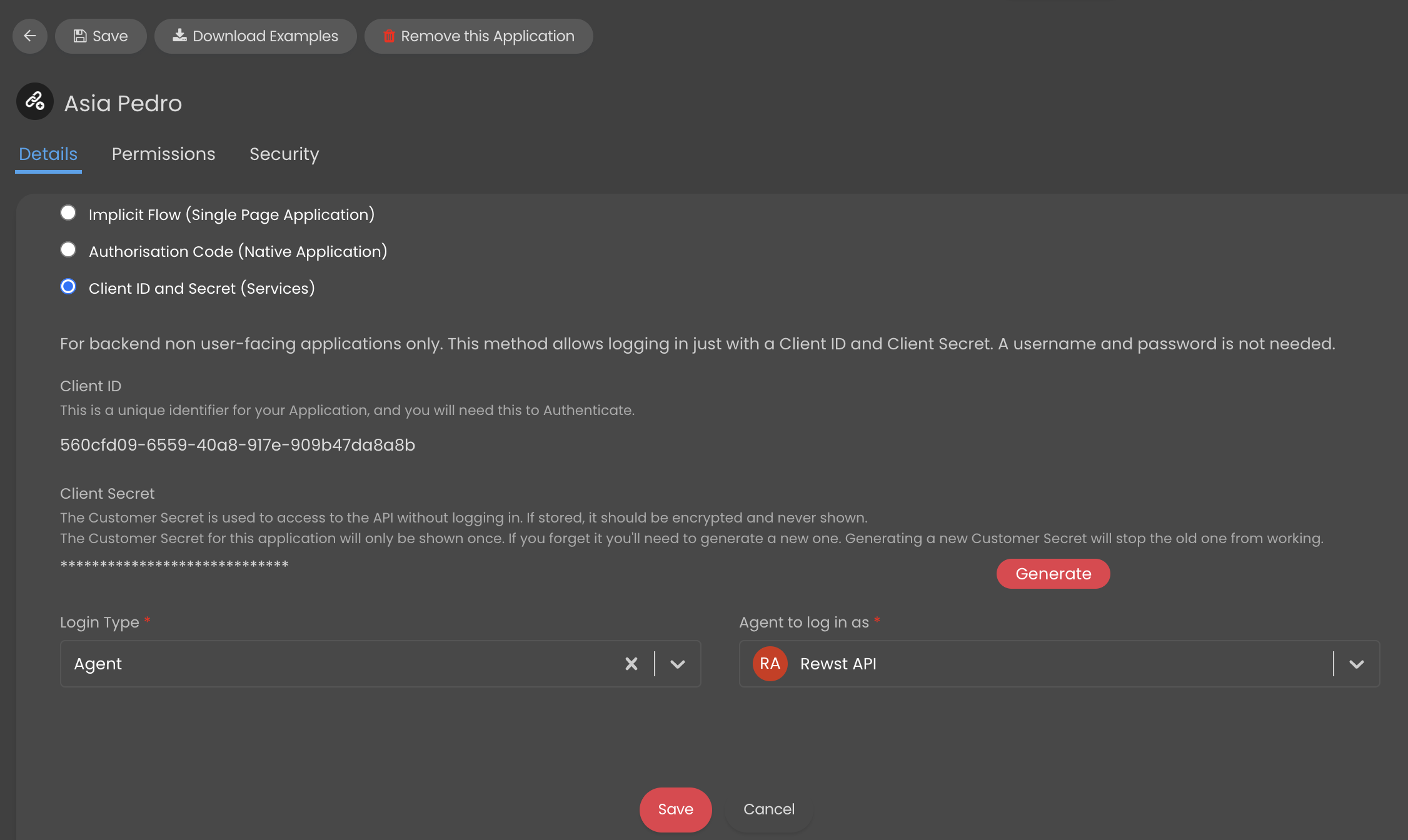
11. Choose the authentication method for **Client ID and Secret (Services)**. Note that when you do this, new drop-down selectors will appear beneath the menu.
12. Ensure that **Agent to log in as** is set to **Rewst API**.
13. Click the **Permissions** tab.
14. Check the **all** checkbox on.\
15. Click **Save**.
1. Navigate to **Configuration > Teams & Agents > Agents**
2. Click on the user you set up for your Rewst integration.
3. Click the **Departments & Teams** tab.
4. Click **Edit** on the top left. Within **Teams**, select **Add**.
5. Add all teams from the **Team** drop-down selector.\
\

6. Click **Save**.
{% hint style="warning" %}
**Required for mapping customers in the Integration**
When creating the API Agent, ensure that the **Allow use of all Customers** Client Restriction setting is set to **Yes** if you want to allow Rewst to interact with your customer records.
{% endhint %}
### Set up steps in Rewst
1. Navigate to **Marketplace > Integrations** in the left side menu of your Rewst platform.
2. In the integrations page, search for `HaloPSA`.\
\

3. Click on the integration tile to launch the **Configuration** setup page.
4. Fill out the form with the details you created:
1. **Client ID**: Fill in the ID for the application registered in HaloPSA.
2. **Client Secret**: Fill in the authentication secret for the application registered in HaloPSA.
3. **Resource Server Hostname**: HaloPSA Resource Server hostname, e.g. `example.halopsa.com`.
4. **Auth Server Hostname**: HaloPSA Auth Server hostname, e.g. `example.halopsa.com/auth,` if different from the Resource Server Hostname.
5. **Is On-Premise?**: Clarify whether or not the HaloPSA instance is hosted on an on-premise server.
6. **Tenant ID**: When using a cloud-hosted Halo PSA instance, this must be specified. This value can be found in the HaloPSA web application under **Configuration > Integrations > HaloPSA API > API Details**.
{% hint style="warning" %}
The Resource Server Hostname and Auth Server Hostname must be in the correct format. Incorrect formatting will lead to setup failure.
Note that the links copied from HaloPSA contain https\:// at their start. You'll need to remove this from the link before pasting into fields in Rewst. For the Resource server, you'll also need to remove the end of the link, /api. See the below example.
Resource Server Hostname: `https://sanboxrewst.halopsa.com/api` should be `sandboxrewst.halopsa.com`
Auth Server Hostname: `https://sanboxrewst.halopsa.com/auth` should be `sanboxrewst.halopsa.com/auth`
{% endhint %}
5. Click **Save Configuration**.
6. Rewst will do a quick validation of your input. Once completed, you'll see a new section beneath the configuration form for[ organization mapping](https://docs.rewst.help/documentation/integrations#what-is-organization-mapping). Complete your mapping as desired.
## Test the integration
1. Navigate to **Automation > Workflows** in Rewst.
2. Create a new workflow and name it with something short and descriptive, such as `Test Halo Integration`.
3. Add the action **List Agents** to the workflow builder canvas, by dragging it from the left pane.\
\
.png?alt=media\&token=48027b45-b534-447b-8247-1e85dcc7e88e)
4. Add a trigger to your test workflow by clicking on the /lightning bolt image. Name your trigger whatever you’d like.
5. Click into the trigger’s settings.
6. Toggle **Enabled** to on.\
\
.png?alt=media\&token=9490b5ea-369b-4570-93cb-32ffd10728f9)
7. Set the **Trigger Type** to **Core - Always Pass**.
8. Click **+** next to **Integration Overrides**. Add **Halo PSA** as your integration override.\
\
.png?alt=media\&token=83fbb262-4812-438c-b00a-837a7c7d7188)
9. In the **Activate Trigger To Run For** section, keep **Selected Organization** toggled on. **Toggle All current and future managed organizations** on, or choose just one or individually selected organizations from the **Organizations** drop-down selector.\
\
.png?alt=media\&token=305db1b3-f502-4f10-a98b-3a542b7ad00f)
10. Click **Submit** to save your trigger.
11. Click **Publish** to save your changes.
12. Click Test to run your workflow. Note that this will bring up a drop-down selector to choosing organizations.
13. Select your MSP level.
14. Click **Test** and confirm that the execution finishes without errors.\
.png?alt=media\&token=f2f7c88a-7b25-4975-bc49-22a04e5951fd)
15. If the test for your MSP is successful, do the same test again. At this point in your steps, select a client organization instead, and ensure that it finishes with no errors.
{% hint style="success" %}
Got an idea for a new Integration? Rewst is constantly adding new integrations to our integrations page. Submit your idea or upvote existing ideas here in our [Canny feedback collector](https://rewst.canny.io/integrations).
{% endhint %}
## Crates related to the HaloPSA integration
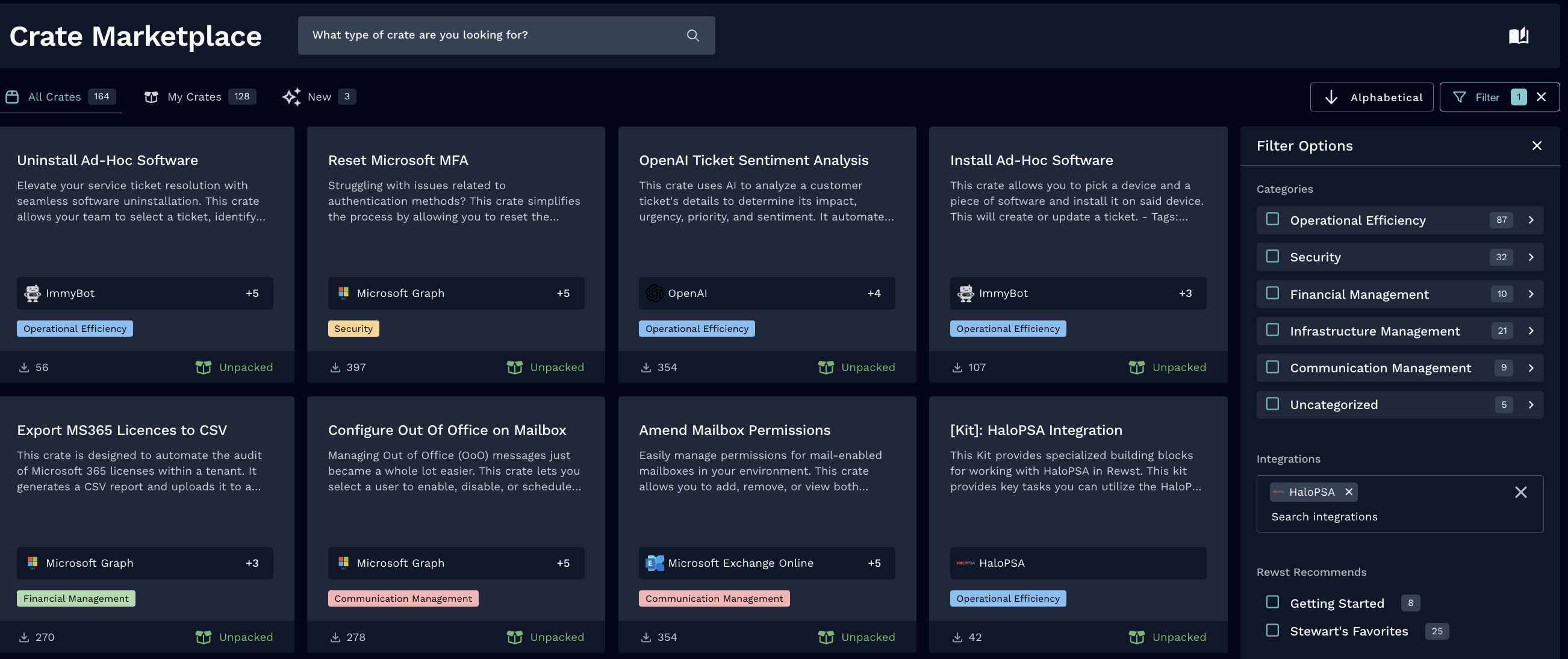
To see an up-to-date list of Crates that can be unpacked after completing HaloPSA integration, navigate to **Marketplace > Crates** in the left side menu of your Rewst platform.
Click **Filter** to expand the filter menu. Enter **HaloPSA** into the **Integrations** field, and watch Rewst filter down to just the Crates that relate to that integration. Any other prerequisites for the Crate will be listed in the right side of that Crate's details page.
## Triggers for HaloPSA integration
| Trigger type name | Type | Description |
| ----------------- | ------- | ---------------------------------------------------------------------------------------------- |
| New Ticket Record | Polling | Trigger which returns an object containing the count of tickets, and an array of ticket object |
## Troubleshoot HaloPSA integration setup
{% hint style="info" %}
Click on any of the issues below to expand and view its solution. If your issue isn't included here, contact Rewst support in your dedicated support Discord channel.
{% endhint %}
Customers are not showing up when refreshing options
Customers not showing when refreshing options is due to an issue with permissions. Make sure to check that both the user and API user have the following permissions, at minimum:
* View Customers
* View Support Tickets
* Add Time Entries
* Create Support Tickets
{% hint style="warning" %}
You may need to uninstall and reinstall the Halo integration for the new permissions to take place.
{% endhint %}
Boards and teams are not visible in configure organizational variable form
If you can't see boards or teams in the configure organizational variable form, this is due to incorrect permissions. You’ll need to add the API User to the teams that you want to see in the form.
Email, name, department is missing or CAB ID is invalid
If you run into an issue where the Email, Name, Department, or other information is missing, or you see that the CAB ID is either invalid or mandatory, this is due to custom fields used in creating tickets. To use these custom ticket fields:
* The Custom Field IDs need to be added as an organization variable
* The Custom Field should not be marked as mandatory
New User Onboarding and Offboarding Crate Halo Issues
Rewst only uses the bare minimum of fields for ticket creation in these Crates.
**Ticket Creation**
* team
* source
* summary
* user\_id
* client\_id
* site\_name
* status\_id
* category\_1
* category\_2
* category\_3
* category\_4
* priority\_id
* details\_html
* tickettype\_id
* new\_approvalprocess\_cab
* type
* cab\_id
**Ticket Updates**
* note
* outcome
* ticket\_id
* new\_status
* who\_agent\_id
* timetaken
{% hint style="warning" %}
It's possible that Halo is set up to require multiple other fields. If this is the case, there are two paths:
1. You can make sure additional fields are not checked as required.
2. You can unsync the Crate and modify it to include the required fields in your setup.
{% endhint %}
General workflow issues
When creating custom workflows, you may encounter the error **HaloPSA integration is not installed**. To resolve this, either install the integration or implement integration overrides.
{% hint style="info" %}
To execute workflows at the MSP level across client accounts, you must configure Halo integration overrides to ensure proper functionality in the workflow and form field triggers
{% endhint %}
Error code: Client error '403 Forbidden' for url
* Check what you have given the API user access to within Halo. This is most frequently the result of a permissions issue.
* Are you able to make any API calls to Halo in a workflow? Can you list clients? If so, this also suggests a permissions error on Halo's side.
## HaloPSA actions and endpoints
{% hint style="info" %}
For more on how actions work in Rewst, check out our [introductory actions documentation here](https://docs.rewst.help/documentation/workflows/actions-in-rewst).
{% endhint %}
| Action Name | Description | Endpoint Related to Action |
| ------------------------------------- | ------------------------------------------------------------------------------------------------------------------------------------------------------------ | ------------------------------ |
| Add or Update Actions | Adds or updates one or more action(s). If id is included then updates, if not included then creates new. Ticket ID is mandatory | /Actions |
| Add or Update Agents | Adds or updates one or more agents(s). If id is included then updates, if not included then creates new. | /Agent |
| Add or Update Appointments | Adds or updates one or more appointment(s). If id is included then updates, if not included then creates new. | /Appointment |
| Add or Update Assets | Adds or updates one or more asset(s). If id is included then updates, if not included then creates new. | /Asset |
| Add or Update Attachments | Adds or updates one or more attachment(s). If id is included then updates, if not included then creates new. The attachment must be posted in Base64 format. | /Attachment |
| Add or Update Clients | Adds or updates one or more client(s). If id is included then updates, if not included then creates new. | /Client |
| Add or Update Contracts | Adds or updates one or more contract(s). If id is included then updates, if not included then creates new. | /ClientContract |
| Add or Update Invoices | Adds or updates one or more invoice(s). If id is included then updates, if not included then creates new. | /Invoice |
| Add or Update Items | Adds or updates one or more item(s). If id is included then updates, if not included then creates new. | /Item |
| Add or Update Knowledge Base Articles | Adds or updates one or more knowledge base article(s). If id is included then updates, if not included then creates new. | /KBArticle |
| Add or Update Opportunities | Adds or updates one or more opportunities. If id is included then updates, if not included then creates new. | /Opportunities |
| Add or Update Organisations | Adds or updates one or more organisation(s). If id is included then updates, if not included then creates new. | /Organisation |
| Add or Update Projects | Adds or updates one or more project(s). If id is included then updates, if not included then creates new. | /Projects |
| Add or Update Quotes | Adds or updates one or more quote(s). If id is included then updates, if not included then creates new. | /Quotation |
| Add or Update Reports | Adds or updates one or more report(s). If id is included then updates, if not included then creates new. | /Report |
| Add or Update Sites | Adds or updates one or more site(s). If id is included then updates, if not included then creates new. | /Site |
| Add or Update Statuses | Adds or updates one or more status(es). If id is included then updates, if not included then creates new. | /Status |
| Add or Update Suppliers | Adds or updates one or more supplier(s). If id is included then updates, if not included then creates new. | /Supplier |
| Add or Update Teams | Adds or updates one or more team(s). If id is included then updates, if not included then creates new. | /Team |
| Add or Update Tickets | Adds or updates one or more ticket(s). If id is included then updates, if not included then creates new. | /Tickets |
| Delete Action | Deletes the Action and related objects with the specified id | /Actions/{action\_id} |
| Delete Agent | Deletes the agent and related objects with the specified id | /Agent/{agent\_id} |
| Delete Appointment | Deletes the Appointment and related objects with the specified id | /Appointment/{appointment\_id} |
| Delete Asset | Deletes the asset and related objects with the specified id | /Asset/{asset\_id} |
| Delete Attachment | Deletes the attachment and related objects with the specified id | /Attachment/{attachment\_id} |
| Delete Client | Deletes the Client and related objects with the specified id | /Client/{client\_id} |
| Delete Contract | Deletes the contract and related objects with the specified id | /ClientContract/{contract\_id} |
| Delete Invoice | Deletes the invoice and related objects with the specified id | /Invoice/{invoice\_id} |
| Delete Item | Deletes the item and related objects with the specified id | /Item/{item\_id} |
| Get Action | Returns a single Action object | /Actions/{action\_id} |
| Get Agent | Returns a single Agent object | /Agent/{agent\_id} |
| Get Appointment | Returns a single Appointment object | /Appointment/{appointment\_id} |
| Get Asset | Returns a single Asset object | /Asset/{asset\_id} |
| List Actions | Returns an object containing the count of actions, and an array of action objects for a given ticket. | /Actions |
| List Agents | Returns an array of Agents | /Agent |
| List Appointments | Returns an array of appointments | /Appointment |
| List Assets | Returns an object containing the count of Assets, and an array of Asset objects | /Asset |
| List Attachments | Returns an array of attachments and their metadata | /Attachment |
| Preview Report | Previews a report from Halo PSA. | /Report |
| List Users | Returns an object containing the count of Users and an array of User objects | /Users |
| List Top Levels | Returns an object containing the count of top levels, and an array containing the top level tree | /Toplevel |
| List Ticket Types | Returns an array of Ticket Types | /TicketType |
| List Tickets | Returns an object containing the count of tickets, and an array of ticket objects | /Tickets |
| List Teams | Returns an array of Teams | /Team |
| List Suppliers | Returns an array of suppliers | /Supplier |
| List Statuses | Returns an array of Statuses | /Status |
| List Sites | Returns an object containing the count of Sites, and an array of Site objects | /Site |
| List Reports | Returns an object containing the count of reports, and an array of report objects | /Report |
| List Quotes | Returns an object containing the count of quotes, and an array of quote objects | /Quotation |
| List Projects | Returns an object containing the count of projects, and an array of project objects | /Projects |
| List Organisations | Returns an array of organisations | /Organisation |
| List Opportunities | Returns an object containing the count of opportunities, and an array of opportunity objects | /Opportunities |
| List Knowledge Base Articles | Returns an array of knowledge base articles | /KBArticle |
| List Items | Returns an object containing the count of items, and an array of item objects | /Item |
| List Invoices | Returns an object containing the count of invoices, and an array of invoice objects | /Invoice |
| List Contracts | Returns an array of contracts | /ClientContract |
| List Clients | Returns an object containing the count of Clients, and an array of Client objects | /Client |
| List Attachments | Returns an array of attachments. Each attachment returned will be in Base64 format. | /Attachment |
| List Assets | Returns an object containing the count of Assets, and an array of Asset objects | /Asset |
| List Appointments | Returns an array of appointments | /Appointment |
| List Agents | Returns an array of Agents | /Agent |
| List Actions | Returns an object containing the count of actions, and an array of action objects for a given ticket. | /Actions |
| Halo PSA API Request | Generic action for making authenticated requests against the Halo PSA API | |
{% hint style="success" %}
Got an idea for a new Integration? Rewst is constantly adding new integrations to our integrations page. Submit your idea or upvote existing ideas here in our [Canny feedback collector](https://rewst.canny.io/integrations).
{% endhint %}
---
# Agent Instructions
This documentation is published with GitBook. GitBook is the documentation platform designed so that both humans and AI agents can read, navigate, and reason over technical content effectively. Learn more at gitbook.com.
## Querying This Documentation
If you need additional information that is not directly available in this page, you can query the documentation by asking a question.
Perform an HTTP GET request on the following URL with the `ask` and `goal` query parameters:
```
GET https://docs.rewst.help/documentation/integrations/integration-guides/halo-integration-setup.md?ask=&goal=
```
`ask` is the immediate question: it should be specific, self-contained, and written in natural language.
`goal` is what the user is ultimately trying to achieve, the reason they need the answer. Sharing it helps GitBook give you a better, more relevant answer. A goal is most helpful when it describes the outcome the user wants rather than restating the question. For example, with `ask=how do I create an API token`, a goal like `automate deployments from our CI pipeline` lets GitBook tailor the answer to that use case.
The response will contain a direct answer to the question and relevant excerpts and sources from the documentation.
Use this mechanism when the answer is not explicitly present in the current page, you need clarification or additional context, or you want to retrieve related documentation sections.