> For the complete documentation index, see [llms.txt](https://docs.rewst.help/llms.txt). Markdown versions of documentation pages are available by appending `.md` to page URLs; this page is available as [Markdown](https://docs.rewst.help/documentation/integrations/integration-guides/duo-integration-setup.md).
# Duo integration setup
{% hint style="info" %}
If you’re new to integrations in Rewst, read through our introductory integration documentation [here](https://docs.rewst.help/documentation/integrations).
{% endhint %}
## What does the Duo integration do?
Our Duo integration enables the automation of multi-factor authentication tasks. Use the Duo API within Rewst workflows to perform actions such as managing users, phones, and bypass codes.
## Set up the Duo integration
### Set up steps in Duo
There are three different APIs provided by Duo, as well as a key to initiate an individual user directory sync. You'll be setting up each of these APIs and pulling information from each to put into Rewst to achieve the integration.
{% stepper %}
{% step %}
**Duo Admin API**
This API allows administrators to manage their Duo accounts programmatically. With the Duo Admin API, administrators can create, update, and delete user accounts, manage two-factor authentication settings, and generate reports on user activity, among other tasks.
{% endstep %}
{% step %}
**Duo Accounts API**
The Accounts API lets customers programmatically create, delete, and manage individual Duo customer accounts. New Duo accounts created using the Accounts API are subaccounts of the account where the Accounts API application exists, creating a parent and child account relationship. A Duo account can have multiple child accounts, but a child account may only have one parent and no child accounts of its own.
{% endstep %}
{% step %}
**Duo Auth API**
This API allows developers to add two-factor authentication to their applications using Duo's authentication service. With the Duo Auth API, developers can authenticate users using Duo's two-factor authentication, retrieve information about users and their devices, and perform administrative tasks related to authentication, among other tasks.
{% endstep %}
{% endstepper %}
#### Set up the Duo API accounts
{% hint style="warning" %}
For all of the following, make sure to copy the designated information into a secure location. Once you migrate away from the page where it is displayed, you won't be able to view that information again.
You will need a Duo account with Admin permissions to complete these steps.
{% endhint %}
1. Create the Duo Admin API by following the instructions [here](https://duo.com/docs/adminapi#first-steps).
* You'll need the integration key, secret key, and API hostname.
* The account should have `Grant Account` read/write permissions.
2. Create the Duo Auth API by following the instructions [here](https://duo.com/docs/authapi).
* You'll need the integration key, secret key, and API hostname.
#### Obtain the Admin API directory key
Now, retrieve the Admin API directory key for directory synchronization. This key is vital for mapping users accurately within Duo's directory sync configurations.
1. Log in to the Duo Admin Panel.
2. Navigate to **Users > External Directories**.
3. Click on your configured directory from the **Directory Syncs** list.
4. Scroll down to the **Admin API directory key** field.
5. Copy the key value and store it someplace secure. You'll need it for further set up steps in Rewst.
{% hint style="info" %}
**Important notes about the directory key:**
* This key must be manually retrieved from the Duo Admin Panel, as it cannot be fetched programmatically via the API.
* The `duo_admin_api_directory_key` is necessary only for configurations that employ directory sync. Its usage is specific to ensuring precise user-directory mapping for each organization.
{% endhint %}
### Set up steps in Rewst
1. Navigate to **Marketplace > Integrations** in the left side menu of your Rewst platform.
2. Search for `Duo` in the integrations page.\
\

3. Click on the integration tile to launch the configuration setup page.
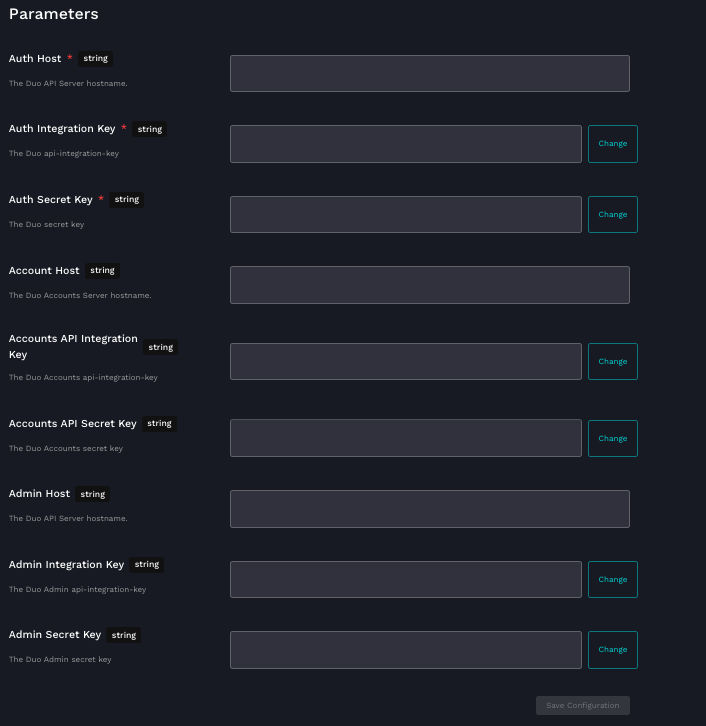
4. Under **Parameters**, enter the information you copied from Duo into its relevant field. Note that all fields are required:
1. **Auth Host:** The Duo API server hostname
2. **Auth Integration Key**: The Duo API integration key
3. **Auth Secret Key**: The Duo secret key
4. **Account Host**: The Duo accounts server hostname
5. **Accounts API Integration Key**: The Duo accounts API integration key
6. **Accounts API Secret Key:** The Duo accounts secret key
7. **Admin Host:** The Duo API server hostname
8. **Admin Integration Key:** The Duo admin API integration key
9. **Admin Secret Key**: The Duo admin secret key
5. Click **Save Configuration**.
6. Rewst will do a quick validation of your input. Once completed, you'll see a new section beneath the configuration form for[ organization mapping](https://docs.rewst.help/documentation/integrations#what-is-organization-mapping). Complete your mapping as desired.
7. Apply the Admin API Directory Key for each organization in the `duo_admin_api_directory_key` field under the organization mapping menu.
{% hint style="success" %}
Got an idea for a new Integration? Rewst is constantly adding new integrations to our integrations page. Submit your idea or upvote existing ideas here in our [Canny feedback collector](https://rewst.canny.io/integrations).
{% endhint %}
## Actions and endpoints
| Category | Action | Description |
| ----------------------- | ------------------------------ | -------------------------------------------------------------- |
| Accounts API | List Accounts | Lists all accounts |
| Accounts API | Create Account | Creates a new account |
| Accounts API | Delete Account | Deletes an account |
| Accounts API | Accounts API Action | Generic action for making requests against the Accounts API |
| Admin API - Bypass Code | List Bypass Codes | Lists all bypass codes |
| Admin API - Bypass Code | Get Bypass Code | Gets a specific bypass code by ID |
| Admin API - Bypass Code | Delete Bypass Code | Deletes a bypass code |
| Admin API - Bypass Code | List Bypass Code(s) By User | Lists bypass codes for a specific user |
| Admin API - Bypass Code | Create Bypass Code for User | Creates bypass codes for a user |
| Admin API - Bypass Code | Retrieve Bypass Codes for User | Retrieves bypass codes for a user |
| Admin API - General | Auth API Action | Generic action for making requests against the Auth API |
| Admin API - General | Admin API Action | Generic action for making requests against the Admin API |
| Admin API - Phones | List Phones | Lists all phones |
| Admin API - Phones | Get Phone | Gets a specific phone by ID |
| Admin API - Phones | Delete Phone by ID | Deletes a phone by ID |
| Admin API - Phones | Send Activation URL | Sends activation URL to a phone |
| Admin API - Phones | Send Activation By SMS | Sends activation link via SMS |
| Admin API - Phones | Send Installation By SMS | Sends installation link via SMS |
| Admin API - Phones | Send Passcode By SMS | Sends passcode via SMS |
| Admin API - Phones | Get User's Phones | Gets all phones associated with a user |
| Admin API - Phones | Assign Phone to User | Assigns a phone to a user |
| Admin API - Phones | Un-assign Phone from User | Removes phone assignment from a user |
| Admin API - Phones | Create Phone | Creates a new phone |
| Admin API - Settings | Retrieve Settings | Retrieves Duo settings |
| Admin API - Settings | Update Settings | Updates Duo settings |
| Admin API - Users | List Users | Lists all users |
| Admin API - Users | Get User by Username | Gets a user by username |
| Admin API - Users | Create User | Creates a new user |
| Admin API - Users | Get User | Gets a user by ID |
| Admin API - Users | Update User | Updates user information |
| Admin API - Users | Delete User | Deletes a user |
| Admin API - Users | Enroll User | Enrolls a user for Duo authentication |
| Admin API - Users | Synchronize Users | Synchronize Users from Azure AD |
| Auth API | Check Auth API Credentials | Carryout check against Duo API host with provided credentials. |
| Auth API | Ping Auth API | Carryout liveness check against Duo API host. |
| Auth API | Send Duo Authentication | Carry out an duo auth - i.e. Push notification. |
---
# Agent Instructions
This documentation is published with GitBook. GitBook is the documentation platform designed so that both humans and AI agents can read, navigate, and reason over technical content effectively. Learn more at gitbook.com.
## Querying This Documentation
If you need additional information that is not directly available in this page, you can query the documentation by asking a question.
Perform an HTTP GET request on the following URL with the `ask` and `goal` query parameters:
```
GET https://docs.rewst.help/documentation/integrations/integration-guides/duo-integration-setup.md?ask=&goal=
```
`ask` is the immediate question: it should be specific, self-contained, and written in natural language.
`goal` is what the user is ultimately trying to achieve, the reason they need the answer. Sharing it helps GitBook give you a better, more relevant answer. A goal is most helpful when it describes the outcome the user wants rather than restating the question. For example, with `ask=how do I create an API token`, a goal like `automate deployments from our CI pipeline` lets GitBook tailor the answer to that use case.
The response will contain a direct answer to the question and relevant excerpts and sources from the documentation.
Use this mechanism when the answer is not explicitly present in the current page, you need clarification or additional context, or you want to retrieve related documentation sections.
 {% endhint %}
### Set up steps in Rewst
1. Navigate to **Marketplace > Integrations** in the left side menu of your Rewst platform.
2. Search for `Duo` in the integrations page.\
\

3. Click on the integration tile to launch the configuration setup page.
4. Under **Parameters**, enter the information you copied from Duo into its relevant field. Note that all fields are required:
1. **Auth Host:** The Duo API server hostname
2. **Auth Integration Key**: The Duo API integration key
3. **Auth Secret Key**: The Duo secret key
4. **Account Host**: The Duo accounts server hostname
5. **Accounts API Integration Key**: The Duo accounts API integration key
6. **Accounts API Secret Key:** The Duo accounts secret key
7. **Admin Host:** The Duo API server hostname
8. **Admin Integration Key:** The Duo admin API integration key
9. **Admin Secret Key**: The Duo admin secret key
{% endhint %}
### Set up steps in Rewst
1. Navigate to **Marketplace > Integrations** in the left side menu of your Rewst platform.
2. Search for `Duo` in the integrations page.\
\

3. Click on the integration tile to launch the configuration setup page.
4. Under **Parameters**, enter the information you copied from Duo into its relevant field. Note that all fields are required:
1. **Auth Host:** The Duo API server hostname
2. **Auth Integration Key**: The Duo API integration key
3. **Auth Secret Key**: The Duo secret key
4. **Account Host**: The Duo accounts server hostname
5. **Accounts API Integration Key**: The Duo accounts API integration key
6. **Accounts API Secret Key:** The Duo accounts secret key
7. **Admin Host:** The Duo API server hostname
8. **Admin Integration Key:** The Duo admin API integration key
9. **Admin Secret Key**: The Duo admin secret key.png?alt=media&token=c906158a-d743-4c80-b4b2-f38a7e0ed173)