> For the complete documentation index, see [llms.txt](https://docs.rewst.help/llms.txt). Markdown versions of documentation pages are available by appending `.md` to page URLs; this page is available as [Markdown](https://docs.rewst.help/documentation/integrations/integration-guides/connectwise-automate-integration-setup.md).
# ConnectWise Automate integration
{% hint style="info" %}
If you’re new to integrations in Rewst, read through our introductory integration documentation [here](https://docs.rewst.help/documentation/integrations).
{% endhint %}
## Why use the ConnectWise Automate integration?
Our ConnectWise Automate integration enables the automation of remote monitoring and management. Use the ConnectWise Automate API within Rewst workflows to perform actions such as endpoint management, remote monitoring, and IT automations.
## Set up the ConnectWise Automate integration
### Set up steps in ConnectWise Automate
{% hint style="info" %}
To create a new ConnectWise Automate integration, you'll need to create a system integrator account.
{% endhint %}
1. Create a user class in ConnectWise Automate for our Rewst User:
1. Log in to ConnectWise Automate Control Center using your administrator credentials.
1. Navigate to **Users and Contacts > User Class Manager** in the **System** menu.
2. Click **+** at the bottom left corner of the **User Class Manager** window.
3. Enter `Rewst Automation`as the name for the new user class. Click **OK**.
4. Set permissions:
* **Core Tab:** Select the new user class and configure the necessary permissions on the "Core" tab.
* **Plugin Tab:** If applicable, configure permissions for specific plugins on the "Plugin" tab.
5. Click **Save**.
2. Click **Settings** in the bottom left corner.
3. Navigate to **User Management**.
4. Click **Add** in the top left.
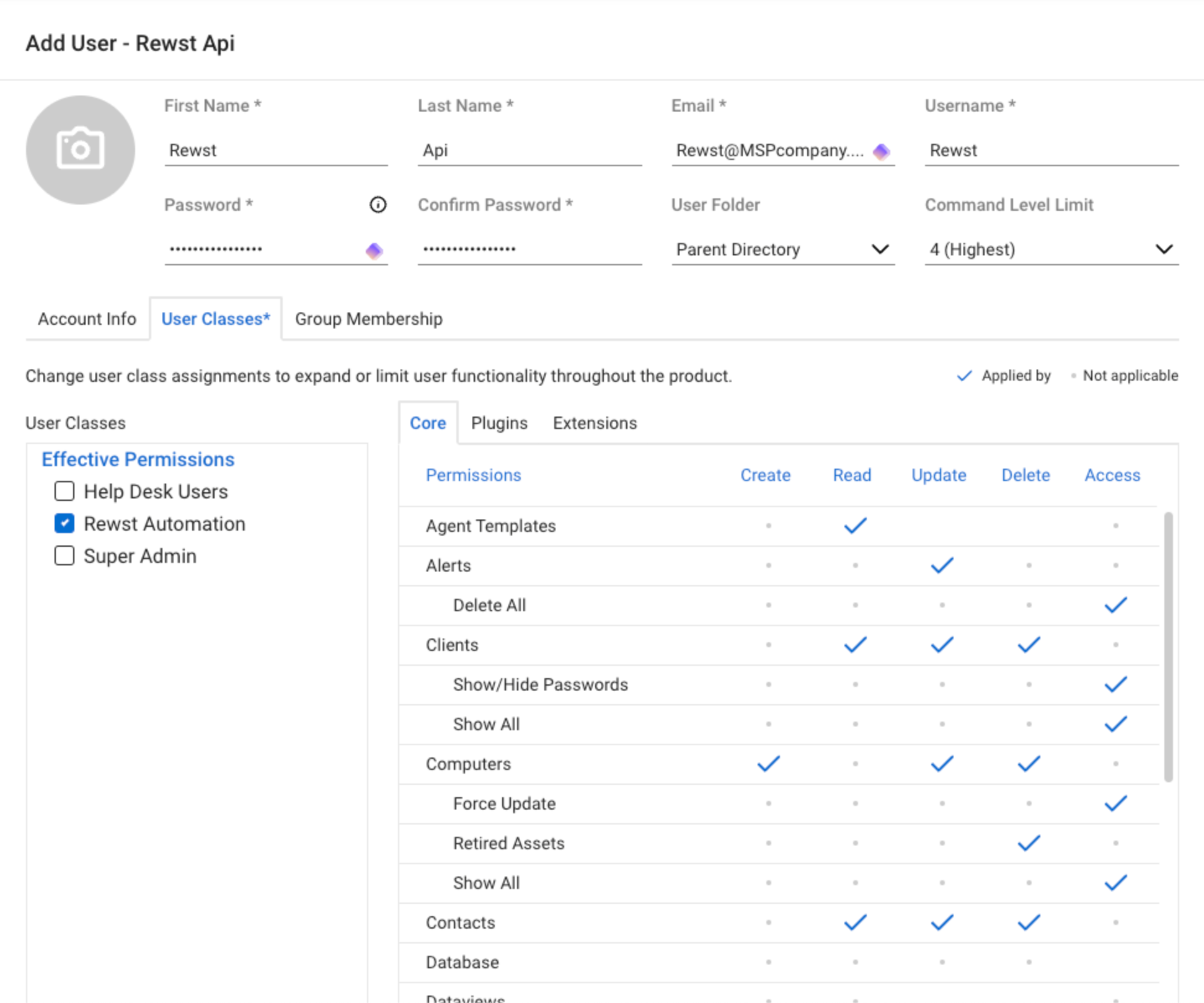
5. Set the **First Name**, **Last Name**, **Email**, **User Name**, and **Password**.
Our recommended setup information for the user
6. **Click** the **User Classes** tab.
7. Click **Edit User Classes**.
8. Select the **Rewst Automation** user class you configured earlier.
8. Check the **Integrator** box at the bottom.
9. Click **Save**.
{% hint style="danger" %}
If you have completed these steps and customers are not showing up when refreshing options, this is a permission issue. validate that you performed the steps above, and check to ensure the user class has access to customers.
{% endhint %}
### Set up steps in Rewst
1. Navigate to **Marketplace > Integrations** in the left side menu of your Rewst platform.
2. Search for `ConnectWise Automate` in the integrations page.\
\

3. Click on the integration tile to launch the configuration setup page.
4. Under **Parameters**, enter the following information from ConnectWise Automate into the relevant fields:
1. **Hostname**
2. **Password** - what is used to log in to ConnectWise Automate
3. **Username**
4. **Client ID** - optional, with Rewst's client ID set as the default if this is not updated
5. **TOTP Secret** - optional, for generating 6-digit MFA codes
5. Click **Save Configuration**.
6. Rewst will do a quick validation of your input. Once completed, you'll see a new section beneath the configuration form for[ organization mapping](https://docs.rewst.help/documentation/integrations#what-is-organization-mapping). Complete your mapping as desired.
{% hint style="info" %}
Note that if you have IP address restrictions in place, you'll need to add the Rewst IP to your allowed list. The US IP for Rewst is 3.139.170.31. For other regional IP information, see our [security policy here](https://docs.rewst.help/security/security-policy).
{% endhint %}
## Use custom PowerShell scripts with your RMM integration
This brand of RMM allows PowerShell scripts to be passed via API. To report the script back to Rewst, you'lll need to add a manual webhook action. We recommend using the run PowerShell script subworkflow to handle this for you and if using custom scripts you will need to add this to bottom to ensure the call back to Rewst is made.
```
$postData = $PS_Results | ConvertTo-Json
Invoke-RestMethod -Method 'Post' -Uri $post_url -Body $postData -ContentType 'application/json;
charset=utf-8'
```
## Least privilege access guide for ConnectWise Automate integration
{% hint style="info" %}
It is assumed that you do not have conflicting permissions on the script level or group level. Additional work may be required if this is the case and Automate documentation should be referenced.
{% endhint %}
{% hint style="danger" %}
You must be careful when assigning permissions to your clients. If you copy the permissions wrong there is a chance you could overwrite existing permissions, please be sure to follow ConnectWise Documentation for best practices for assigning the client permissions.
{% endhint %}
For more information on how to set up user classes and client permissions please visit [Connectwise Automate documentation.](https://docs.connectwise.com/ConnectWise_Automate_Documentation/060/300)
### Configure user class permissions
To be able to utilize Rewst with least privilege you will need to configure a new user class named `Rewst Automation`. The class should then be configured with the following permissions.
#### User class permission
| Actions | Permission |
| ----------------------------- | ---------------------------- |
| Agent Templates | Read |
| Alerts | Update |
| Clients | Read, Update, Delete |
| Clients → Show/Hide Passwords | Access |
| Clients → Show All | Access |
| Computers → Force Update | Access |
| Computers → Retired Assets | Delete |
| Computers → Show All | Access |
| Contacts | Read, Update, Delete |
| Groups | Create, Update, Delete |
| Groups → Scheduled Scripts | Update |
| Locations → Show All | Access |
| Patch Manager | Read, Update |
| Scripts | Read, Update, Delete |
| Scripts → Schedule Scripts | Update |
| Searches → Send Commands | Access |
| Tickets | Create, Read, Update, Delete |
| Tickets → Ticket Requests | Access |
## Configure client level permissions
### Client level permissions
| Actions | Permission |
| ------------ | ------------------ |
| Locations | Read, Edit, Delete |
| Projects | Read |
| Product Keys | Read |
| Documents | Read |
| Passwords | Read |
### Default computer permissions: Enabled if listed
| Actions | Permission |
| ------------------ | ---------- |
| Command Prompt | Access |
| Software and Tools | Install |
| History | Access |
| Commands | View, Send |
| Scripts | Schedule |
| Information | Edit |
| Alerts | Clear |
| Scheduled Scripts | Delete |
## Triggers for ConnectWise Automate integration
| Trigger type name | Type | Description |
| ----------------------- | ------- | ----------------------------------------- |
| Detect Script Execution | Polling | Triggers when a script is running |
| New Computer | Polling | Triggers when a new computer is added |
| New Event Log | Polling | Triggers when a new event log is detected |
| New Running Script | Polling | Triggers when a script is running |
## Actions and endpoints
{% hint style="info" %}
For more on how actions work in Rewst, check out our [introductory actions documentation here](https://docs.rewst.help/documentation/workflows/actions-in-rewst).
{% endhint %}
| Category | Action | Description |
| ------------------- | ---------------------------- | ------------------------------------------------------------------------------------- |
| **Computers** | List Computers | |
| **Computers** | Get Computer Devices | List a computer's devices |
| **Computers** | Get Computer Services | List a computer's services |
| **Computers** | List Computer Drives | List Drives |
| **Computers** | Get Computer Patching Stats | Retrieve an individual computer's patching statistics |
| **Computers** | Get Computer PatchJobs | List a computer's patch jobs |
| **Computers** | List Retired Assets | |
| **Contacts** | List Contacts | |
| **Contacts** | List System Contacts | |
| **Extrafields** | Get Location EDFs | List extra data fields from the specified location |
| **Extrafields** | Get Computer EDFs | List extra data fields from the specified computer |
| **Extrafields** | Get Client EDFs | List extra data fields from the specified client |
| **Extrafields** | Get Contact EDFs | List extra data fields from the specified contact |
| **Extrafields** | Update Extra Data Field | Description coming soon... |
| **Extrafields** | List Extra Data Field(s) | Description coming soon... |
| **Generic Request** | CW Automate API Request | Generic action for making authenticated requests against the ConnectWise Automate API |
| **Groups** | List Groups | |
| **Networkdevices** | List Network Devices | |
| **Remoteagent** | List Agent Templates | |
| **Searches** | List Searches | |
| **System** | List Users | List Automate users |
| **System** | Add User | Add a new Automate user |
| **System** | Get User | Retrieve an individual user |
| **System** | Delete User | Delete an automate user |
| **System** | List User Folders | List user folders |
| **System** | List User Classes | List user classes |
| **System** | Get System Patch Information | Retrieve patch build information |
{% hint style="success" %}
Got an idea for a new Integration? Rewst is constantly adding new integrations to our integrations page. Submit your idea or upvote existing ideas here in our [Canny feedback collector](https://rewst.canny.io/integrations).
{% endhint %}
---
# Agent Instructions
This documentation is published with GitBook. GitBook is the documentation platform designed so that both humans and AI agents can read, navigate, and reason over technical content effectively. Learn more at gitbook.com.
## Querying This Documentation
If you need additional information that is not directly available in this page, you can query the documentation by asking a question.
Perform an HTTP GET request on the following URL with the `ask` and `goal` query parameters:
```
GET https://docs.rewst.help/documentation/integrations/integration-guides/connectwise-automate-integration-setup.md?ask=&goal=
```
`ask` is the immediate question: it should be specific, self-contained, and written in natural language.
`goal` is what the user is ultimately trying to achieve, the reason they need the answer. Sharing it helps GitBook give you a better, more relevant answer. A goal is most helpful when it describes the outcome the user wants rather than restating the question. For example, with `ask=how do I create an API token`, a goal like `automate deployments from our CI pipeline` lets GitBook tailor the answer to that use case.
The response will contain a direct answer to the question and relevant excerpts and sources from the documentation.
Use this mechanism when the answer is not explicitly present in the current page, you need clarification or additional context, or you want to retrieve related documentation sections.