> For the complete documentation index, see [llms.txt](https://docs.rewst.help/llms.txt). Markdown versions of documentation pages are available by appending `.md` to page URLs; this page is available as [Markdown](https://docs.rewst.help/documentation/crates/existing-crate-documentation/dropsuite-new-account-crate.md).
# Dropsuite: New Account Crate
{% hint style="info" %}
If you’re new to Crates, read through our introductory Crate documentation [here](https://docs.rewst.help/prebuilt-automations/crates). Find the Crate in our Crate Marketplace.
{% endhint %}
## What does the Dropsuite: New Account Crate do?
This Crate allows you to create a Dropsuite organization by filling out a Rewst form.
### How the Crate works
1. The workflow is triggered when a user fills out and submits the form included in this Crate.
2. The workflow automatically provisions a new Dropsuite Organization using the information provided in the Rewst form.
3. Upon successful creation, an SSO link for the new Dropsuite account is generated and added to a PSA ticket for easy access.
## Crate prerequisites
* Your [Dropsuite integration](/documentation/integrations/integration-guides/dropsuite-integration.md) with Rewst must successfully be set up before unpacking this Crate.
* Your [PSA must successfully be integrated](/documentation/integrations/top-5-integration-types-get-started-with-integrations-in-rewst.md#psa-integrations-offered-by-rewst) with Rewst.
## Unpack the Dropsuite: New Account Crate
1. Navigate to **Marketplace > Crates** in the left side menu of the Rewst platform.
2. Search for `Dropsuite: New Account`.
3. Click on the Crate tile to begin unpacking.
4. Click **Unpack Crate**.
5. Click **Continue**.
6. Note the option under the **Form Submission** accordion menu to activate the Crate for all future organizations in addition to the current one. This is defaulted to on for the Crate. You may also set activation to certain [tags](https://docs.rewst.help/documentation/settings/tags-in-rewst), [trigger criteria](/documentation/automations/intro-to-triggers/trigger-criteria.md), or for integration overrides.
7. Click **Unpack**.
### Use the Crate
#### Fill out the form
1. Navigate to **Automations > Assets > Forms** in the left side menu of your Rewst platform.
2. Search for `[REWST - PROCESS] Dropsuite: New Account`.
3. Click **⋮ > Usages > View Direct URLs**.
4. Click on the link for the Rewst organization for which you want to create a new Dropsuite organization. This will launch the form in a new tab.
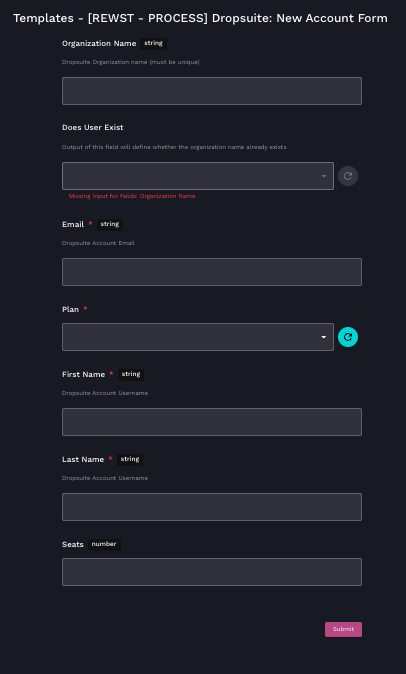
5. Enter or choose the information in each of the following fields:
1. **Organization Name** - Enter the unique name you would like to give your Dropsuite organization.
2. **Does User Exist** - The output of this field will define whether the organization name already exists, or if it will be a new organization.
3. **Email** - Enter the Dropsuite account email.
4. **Plan** - Choose the indicated Dropsuite plan from the drop-down selector.
5. **First Name** - Enter the first name of the Dropsuite account username.
6. **Last Name -** Enter the last name of the Dropsuite account username.
7. **Seats** - Enter the number of seats you will need for the account.
6. Click **Submit**.
7. Check in Dropsuite to ensure that the organization has been created.
## Organization variables associated with this Crate
{% hint style="info" %}
For more on organization variables and how to use them, see our org variable documentation [here](https://docs.rewst.help/documentation/configuration/organization-variables).
Organization variables not found in our standard organization variables documentation, such as the ones listed below. are typically system variables that are handled by integration mappings.
If you haven't done so already, we recommended that you run the [Configure Organization Variables Crate](https://docs.rewst.help/documentation/crates/existing-crate-documentation/configure-organization-variables), which will help you set org variables that are relevant to you and your customer's environments.
{% endhint %}
* `cw_manage_company_id`
* `datto_company_id`
* `default_psa`
* `freshdesk_company_id`
* `halo_general_user_override`
* `halo_psa_client_id`
* `halo_ticket_site_name`
* `kaseya_bms_account_id`
* `ninja_org_id`
* `priority`
* `psa_datto_default_issue_type`
* `psa_datto_default_sub_issue_type`
* `psa_datto_default_ticket_category`
* `psa_datto_default_ticket_type`
* `psa_default_agreement_name`
* `psa_default_board_id`
* `psa_default_contact_email`
* `psa_default_requester_id`
* `psa_default_tech_id`
* `psa_default_ticket_category`
* `psa_default_ticket_cause`
* `psa_default_ticket_impact`
* `psa_default_ticket_priority`
* `psa_default_ticket_severity`
* `psa_default_ticket_source`
* `psa_default_ticket_status`
* `psa_default_ticket_subcategory`
* `psa_default_ticket_subcause`
* `psa_default_ticket_type`
* `psa_default_ticket_urgency`
* `psa_halo_cab_id`
* `psa_halo_cab_type`
* `psa_new_user_ticket_item`
* `psa_new_user_ticket_subtype`
* `psa_new_user_ticket_type`
* `psa_ticket_status_waiting_input`
* `service_request_queue_name`
* `servicenow_account_id`
* `superops_client_id`
* `superops_default_requester_id`
* `superops_site_id`
{% hint style="info" %}
Got an idea for a new Crate? Rewst is constantly adding new Crates to our Crate Marketplace. Submit your idea or upvote existing ideas here in our [Canny feedback collector](https://rewst.canny.io/crates).
{% endhint %}
---
# Agent Instructions
This documentation is published with GitBook. GitBook is the documentation platform designed so that both humans and AI agents can read, navigate, and reason over technical content effectively. Learn more at gitbook.com.
## Querying This Documentation
If you need additional information that is not directly available in this page, you can query the documentation by asking a question.
Perform an HTTP GET request on the following URL with the `ask` and `goal` query parameters:
```
GET https://docs.rewst.help/documentation/crates/existing-crate-documentation/dropsuite-new-account-crate.md?ask=&goal=
```
`ask` is the immediate question: it should be specific, self-contained, and written in natural language.
`goal` is what the user is ultimately trying to achieve, the reason they need the answer. Sharing it helps GitBook give you a better, more relevant answer. A goal is most helpful when it describes the outcome the user wants rather than restating the question. For example, with `ask=how do I create an API token`, a goal like `automate deployments from our CI pipeline` lets GitBook tailor the answer to that use case.
The response will contain a direct answer to the question and relevant excerpts and sources from the documentation.
Use this mechanism when the answer is not explicitly present in the current page, you need clarification or additional context, or you want to retrieve related documentation sections.