# Troubleshoot unpacked Crate forms

{% hint style="info" %}
For more information on unpacking Crates, see our Crate documentation [here](https://docs.rewst.help/prebuilt-automations/crates#unpack-a-crate).
{% endhint %}

If a form field of a form unpacked from a Crate isn't populating with information, you have two options.

1. Identify the issue by digging into the form.
2. Open a support ticket with Rewst's support team and have them troubleshoot the issue for you.

Either option will require you to collect information from the form by completing the following steps. As an example, we're using the **\[Rewst Master v3] User Onboarding Minimalistic** form.

1. Navigate to **Automations > Assets > Forms**.
2. Open the form in question.
3. Scroll down in the right side menu. Click on any field that's further down in the field list.
4. Click on the field. This will open its information in the right side menu.

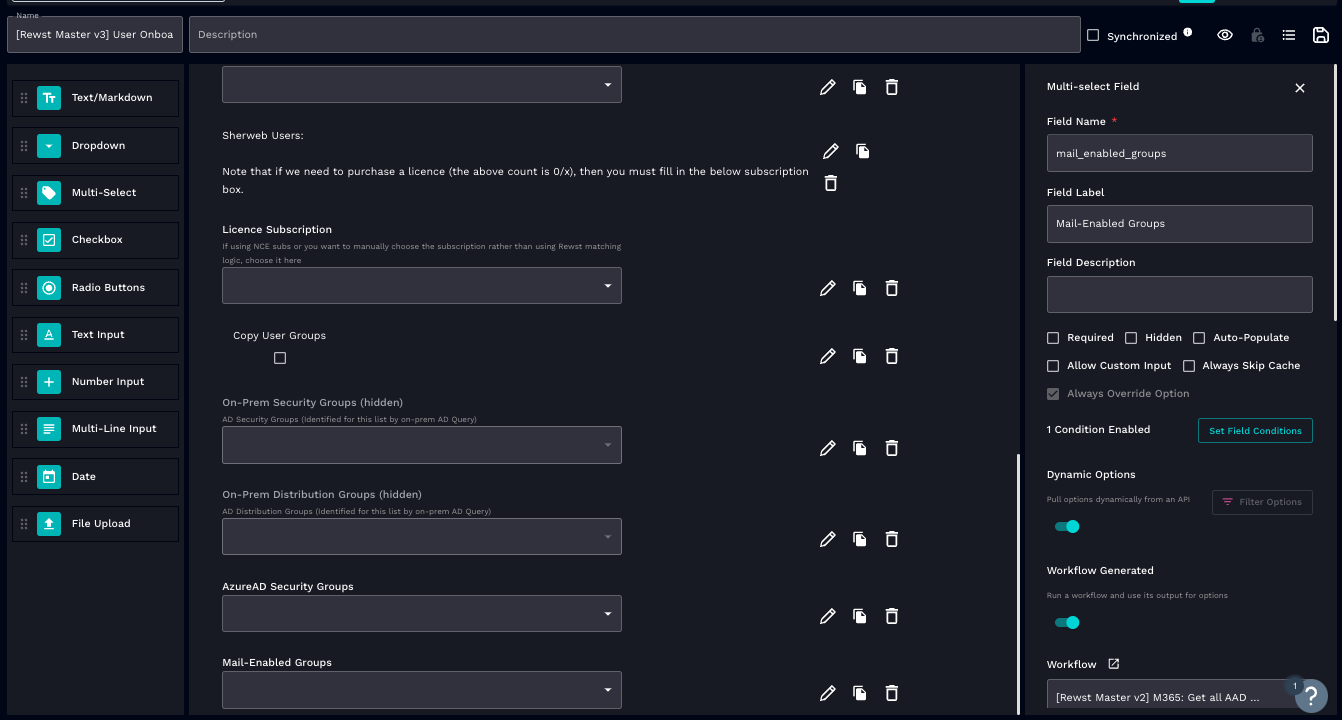
<figure><img src="/files/QxoDAW8VpnvdhqwR0WYW" alt=""><figcaption><p>The view of an expanded form field, open for editing</p></figcaption></figure>

5. Scroll down to see if the field is a dynamic field. If it is, **Dynamic Options** will be toggled **on**.
6. Confirm if the field has **Workflow Generated** toggled **on**. If so, look at the options generator in the **Workflow** field beneath it.
7. Open the options generator by clicking ![](/files/klgauGlRlsON2g7gZPtW).
8. Click **View results for workflow**.\
   \ <img src="/files/pUiICZd5nUerMmmFtE4v" alt="" data-size="original">
9. View the list of all times the workflow has run. Errors will be denoted by **Failed**.\ <img src="/files/gpaZxC1irWmseGjBksEL" alt="" data-size="original">
10. Click on failed execution rows to see more information.
11. Click on any of the failed actions in the list at the bottom of the page to examine its **Workflow Execution** log.

    1. If troubleshooting the issue yourself, find the errors in the workflow execution and correct them.
    2. If creating a ticket for Rewst support, copy the URL of your browser while viewing this information, and paste it into your support ticket.
    3. You can also ask [RoboRewsty](/documentation/roborewsty.md) to help you troubleshoot your execution results.

    <figure><img src="/files/TDqqogolT8KLmGIVqliQ" alt=""><figcaption><p>Click on ... under errors to expand error information</p></figcaption></figure>


---

# Agent Instructions: Querying This Documentation

If you need additional information that is not directly available in this page, you can query the documentation dynamically by asking a question.

Perform an HTTP GET request on the current page URL with the `ask` query parameter:

```
GET https://docs.rewst.help/documentation/automations/forms/troubleshoot-unpacked-crate-forms.md?ask=<question>
```

The question should be specific, self-contained, and written in natural language.
The response will contain a direct answer to the question and relevant excerpts and sources from the documentation.

Use this mechanism when the answer is not explicitly present in the current page, you need clarification or additional context, or you want to retrieve related documentation sections.
