> For the complete documentation index, see [llms.txt](https://docs.rewst.help/llms.txt). Markdown versions of documentation pages are available by appending `.md` to page URLs; this page is available as [Markdown](https://docs.rewst.help/documentation/automations/forms.md).
# Forms
## What is a form?
In Rewst, every automation starts with a single click. *Forms* are powerful tools used to collect the information your workflows need to start. They streamline the data collection process by gathering key details from users such as names, dates, or options. Forms can be manually created, or added as part of [Crate unpacking](https://docs.rewst.help/prebuilt-automations/crates#unpack-a-crate).
Rewst's form functionality is designed to empower users with the tools to build interactive, responsive, and customizable forms.
## Why use forms?
Forms collect data in one simple step, reducing manual data entry and saving you time. They can also function as triggers in Rewst when building workflows, allowing for seamless transitions and increased efficiency. Use a form submission in your workflow if user input is required for the automation to run. You wouldn't use a form, for example, if the all the information needed for the automation to run could be retrieved via webhook trigger.
Expand the reach of your forms by embedding them into various web pages, providing increased accessibility to users. Tailor forms to specific scenarios through cloning and modification, ensuring the right fit for every situation.
## View forms in Rewst
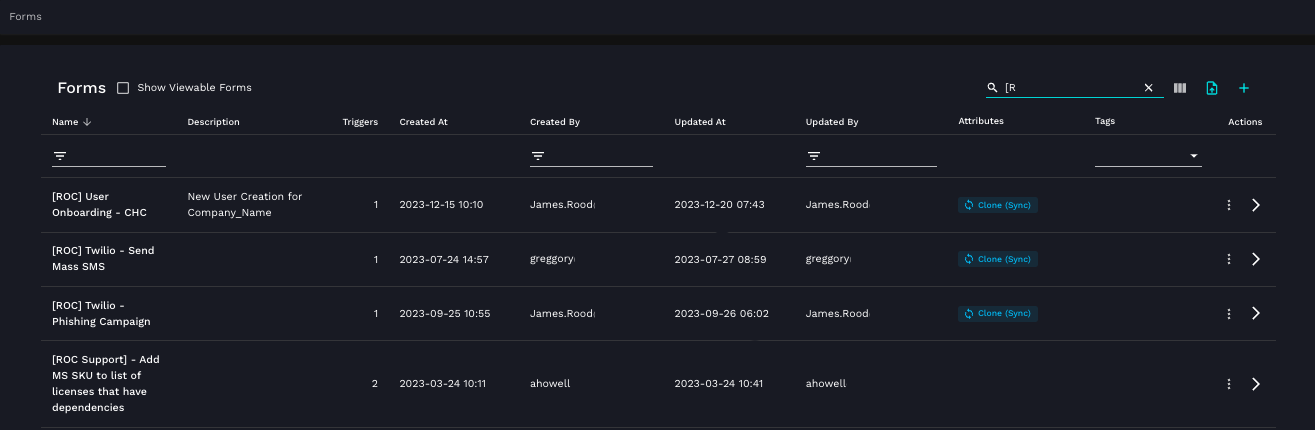
Access all forms, be they manually created by you or obtained as part of unpacking Crates, by navigating to **Automations > Assets > Forms** in the left side menu.
An example of what your forms page might look like
### Export and import forms
You can export a form to share with other Rewst customers, or create your own hard copies of form backups. To export a form as a JSON bundle, **click ⋮ > Export** next to your relevant form in the total form list.
To import a form bundled as a JSON file, click  in the top right navigation bar of the forms page. Then, drag and drop your file into the upload dialog that appears.
## Request a forms feature update
We’re constantly adding new features to Rewst. If you have a suggestion for what we could add to our forms functionality, add a request or upvote other existing suggestion posts [in our Canny.](https://rewst.canny.io/integrations)
{% hint style="success" %}
Want to learn more? Search for the **How to build forms** course in Cluck University.
{% endhint %}
---
# Agent Instructions
This documentation is published with GitBook. GitBook is the documentation platform designed so that both humans and AI agents can read, navigate, and reason over technical content effectively. Learn more at gitbook.com.
## Querying This Documentation
If you need additional information that is not directly available in this page, you can query the documentation by asking a question.
Perform an HTTP GET request on the following URL with the `ask` and `goal` query parameters:
```
GET https://docs.rewst.help/documentation/automations/forms.md?ask=&goal=
```
`ask` is the immediate question: it should be specific, self-contained, and written in natural language.
`goal` is what the user is ultimately trying to achieve, the reason they need the answer. Sharing it helps GitBook give you a better, more relevant answer. A goal is most helpful when it describes the outcome the user wants rather than restating the question. For example, with `ask=how do I create an API token`, a goal like `automate deployments from our CI pipeline` lets GitBook tailor the answer to that use case.
The response will contain a direct answer to the question and relevant excerpts and sources from the documentation.
Use this mechanism when the answer is not explicitly present in the current page, you need clarification or additional context, or you want to retrieve related documentation sections.